 PH
PHcristhevirgin
Forum Guru
Hello po!! Maiba muna po tayo.
Listen to YouTube With Screen OFF on your Smartphone: YouTube is the most popular video streaming site. YouTube has a great collection of videos to watch. Listening to a video on YouTube with screen off is not possible in the YouTube app.
The only limitation of YouTube app is – no option available for listening video with screen off. When you are listening video on YouTube you can’t use any other app or screen because when you move to another app video will automatically stops and if you lock your screen video will no longer play on your device.
If you are listening videos on YouTube at night your phone battery will get drained. This is so frustrating situation when the video will no longer play. By default, there is no option available in the YouTube app.
And then how you can listen to YouTube videos with the screen off?? When I was facing this problem, then the same question came in my mind? Then I found some free ways for this problem. In this tutorial, you can learn “How to listen to YouTube videos with Screen Off on your smartphone”.
Here are some ways to listen to YouTube videos with Screen Off:
Method 1: Listen to YouTube With Screen Off in FireTube App (for Android)
Fire Tube: Fire Tube is a great app in which you can listen to the video in the background with screen off. In FireTube, you can search the videos which you want to listen.
When you are listening video on FireTube you can use any other app and screen video will not stop.
FireTube is not available on play store. So you have to download apk file on your device. Let me tell you how you can install the app:
Step1: First go to the downloading page of FireTube
You can go from this link
Step:2 After downloading the apk file to install the app on your device while installing the app you need to enable an unknown source option in the device.
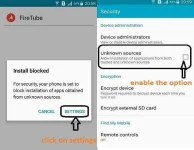
Just go to settings-> security and then click on the unknown source option.
Step:3 After installing the app just open the app and go to settings and click on “always video mode”. After that, you can search videos to click on the search button.
Just type any song name or artist name. Look the way you search on YouTube and this app will run exactly like YouTube.
Like YouTube, you can change the video quality in the settings. With this app, you can listen to YouTube without video.
Method 2: How to listen to YouTube videos with the Screen Off in Firefox browser:
Many Android users use google chrome but Firefox is a good alternative for playing video in the background with Screen Off. Maybe you find this method little weird, but it works well.
Simply download the MOZILLA FIREFOX browser app from Play Store. Open the app and go to settings (three dots) at the right side and just click on request desktop site.
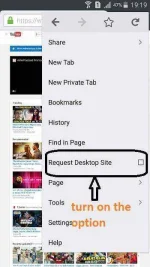
After that, go to YouTube.com in a browser and then search any video and you can listen to a YouTube video with Screen Off. If you turn off the screen video will not stop playing. This method is also working with google chrome.
Method 3: How to listen to a YouTube video with Screen Off in the iPhone or iPad (for iOS)
Firefox and chrome method will not work in ios. In ios, a method is little different.
Simply move to Safari browser and open YouTube website. Search any video which you want to listen and play the video and turn off the screen video will stop. But you don’t wry, only press home button to show your control center, and then you will see different options to play video. Just tap on play button your video will play with screen off without any problem.
Conclusion: I would personally suggest you FireTube app. FireTube will give you features just like YouTube. I am also using FireTube for listening videos and it saves phone battery a lot.
Source: You do not have permission to view the full content of this post. Log in or register now.
P.S.
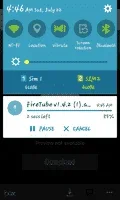
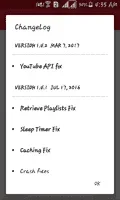
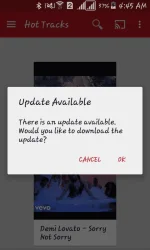
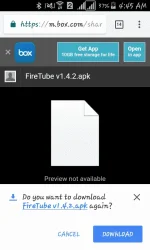
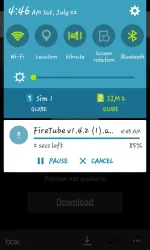
May magpa-pop up po na 'this app can harm your android' pero hindi po 'yun totoo. Tried and tested na po iyan sa akin, proof? See the pictures below.
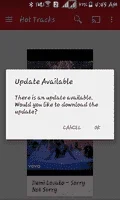
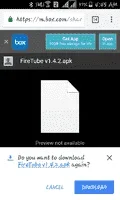


------------------------------------------------------------------------------------------------------------------------------------
Don't forget to hit the like button and comment if this thread helps you.
Follow me for more interesting and fully detailed tutorials: cristhe******
Listen to YouTube With Screen OFF on your Smartphone: YouTube is the most popular video streaming site. YouTube has a great collection of videos to watch. Listening to a video on YouTube with screen off is not possible in the YouTube app.
The only limitation of YouTube app is – no option available for listening video with screen off. When you are listening video on YouTube you can’t use any other app or screen because when you move to another app video will automatically stops and if you lock your screen video will no longer play on your device.
If you are listening videos on YouTube at night your phone battery will get drained. This is so frustrating situation when the video will no longer play. By default, there is no option available in the YouTube app.
And then how you can listen to YouTube videos with the screen off?? When I was facing this problem, then the same question came in my mind? Then I found some free ways for this problem. In this tutorial, you can learn “How to listen to YouTube videos with Screen Off on your smartphone”.
Here are some ways to listen to YouTube videos with Screen Off:
Method 1: Listen to YouTube With Screen Off in FireTube App (for Android)
Fire Tube: Fire Tube is a great app in which you can listen to the video in the background with screen off. In FireTube, you can search the videos which you want to listen.
When you are listening video on FireTube you can use any other app and screen video will not stop.
FireTube is not available on play store. So you have to download apk file on your device. Let me tell you how you can install the app:
Step1: First go to the downloading page of FireTube
You can go from this link
. While downloading this app just ignore the notification about the apk file. This apk file doesn’t harm your device.You do not have permission to view the full content of this post. Log in or register now.
Step:2 After downloading the apk file to install the app on your device while installing the app you need to enable an unknown source option in the device.
Just go to settings-> security and then click on the unknown source option.
Step:3 After installing the app just open the app and go to settings and click on “always video mode”. After that, you can search videos to click on the search button.
Just type any song name or artist name. Look the way you search on YouTube and this app will run exactly like YouTube.
Like YouTube, you can change the video quality in the settings. With this app, you can listen to YouTube without video.
Method 2: How to listen to YouTube videos with the Screen Off in Firefox browser:
Many Android users use google chrome but Firefox is a good alternative for playing video in the background with Screen Off. Maybe you find this method little weird, but it works well.
Simply download the MOZILLA FIREFOX browser app from Play Store. Open the app and go to settings (three dots) at the right side and just click on request desktop site.
After that, go to YouTube.com in a browser and then search any video and you can listen to a YouTube video with Screen Off. If you turn off the screen video will not stop playing. This method is also working with google chrome.
Method 3: How to listen to a YouTube video with Screen Off in the iPhone or iPad (for iOS)
Firefox and chrome method will not work in ios. In ios, a method is little different.
Simply move to Safari browser and open YouTube website. Search any video which you want to listen and play the video and turn off the screen video will stop. But you don’t wry, only press home button to show your control center, and then you will see different options to play video. Just tap on play button your video will play with screen off without any problem.
Conclusion: I would personally suggest you FireTube app. FireTube will give you features just like YouTube. I am also using FireTube for listening videos and it saves phone battery a lot.
Source: You do not have permission to view the full content of this post. Log in or register now.
P.S.
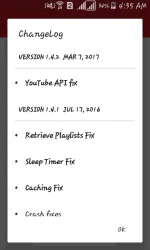
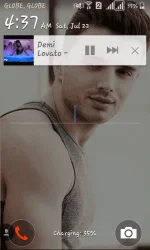
May magpa-pop up po na 'this app can harm your android' pero hindi po 'yun totoo. Tried and tested na po iyan sa akin, proof? See the pictures below.
------------------------------------------------------------------------------------------------------------------------------------
Don't forget to hit the like button
and comment if this thread helps you.Follow me for more interesting and fully detailed tutorials: cristhe******
Attachments
-
 Screenshot_2017-07-22-04-35-53.webp20.6 KB · Views: 28
 -
 Screenshot_2017-07-22-04-37-38.webp72.7 KB · Views: 24
 -
 Screenshot_2017-07-22-04-37-50.webp47 KB · Views: 25
 -
 Screenshot_2017-07-22-04-45-24.webp32.7 KB · Views: 27
 -
 Screenshot_2017-07-22-04-45-49.webp40.4 KB · Views: 25
 -
 Screenshot_2017-07-22-04-46-02.webp27.5 KB · Views: 27