 PH
PH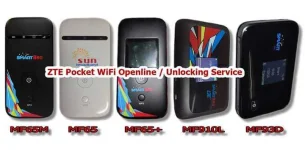
Unlock Smart Pocket WiFi Zte
Message me for Codes >>mervinponce19@gmail.com
Tut:
Requirements:
-Brain / Common Sense
-ZTE Pocket Wifi
-Desktop or Laptop
-USB Cable
-TM / Globe Sim Card
-Chrome Browser (Not IE, Not Mozilla)
PROCEDURE:
STEP 1. Insert TM / Globe Sim Card to your Pocket Wifi then power on.
STEP 2.Connect your ZTE Pocket Wifi to desktop or laptop via USB Cable..
STEP 3. Log in to You do not have permission to view the full content of this post. Log in or register now. or You do not have permission to view the full content of this post. Log in or register now. in Chrome browser
(password: smartbro) or (admin kung suncell)
STEP 4. Now, Go to Settings, Network setting, APN
STEP 5. Press F12 or Ctrl + Shift + i
STEP 6. Press Ctrl + F then find keyword Unlock
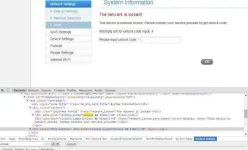
STEP 7. To Reveal unlock dialog box, simply double click 3 none then replace with yes
( see picture below ) double click to enlarge the pictures.

LAST STEP 8. Enter 16 digit unlock code then press ENTER Done!
( see picture below )
BABALA:
Mag-ingat po tayo sa mga nagkalat na SCAMMER at nagpapanggap
na Legit kuno pero wala naman maipakitang mga Positive Feedbacks or Legit na transaction. Karamihan sa kanila ay nag-aalok ng murang halaga para mabilis nilang mahikayat yung mga bibiktimahin nila.