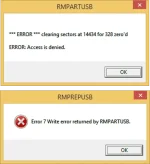
PH
PHTested Multiple O.S. with Hiren's Boot CD in 1 USB flash Driive,(For PC Technicians)
Good Day po sa Inyo mga Sir/Madam,.
May ibabahagi po sana akong isang bagay na magagamit nating mga Technicians pag Dating sa Pag rereformat ng Laptop,Netbook, Or Even Desktop PC.
Madami po akong na search dito pero yung iba Tested? yung Iba hindi,. So Bilang Cp at PC Technicians,. Share ko po sa inyo ang Procedures nito,..
Ang laman po ng USB Bootable Flash Drive is Dalawang O.S. Windows XP, Windows 7 at Pwede natin Isama ang HYREN Boot CD na napakalaki rin ng naitutulong sa mga PC Technicians,.
Procedures lang po ang ise-share ko. If may OS kayo yun nalang po ang Gamitin nyo,.
So Eto po Yung Applications na gamit,..
WinSetup-1-0-beta7
You do not have permission to view the full content of this post. Log in or register now.
Extract nyo po yung Files Then Open nyo po yung exe files,
Then insert nyo na po yung Flash Drive na gagamitin nyo,. gamit ko po ay 8GB
Let's Start
http://phc.onl/#forbidden#/attachments/1-png.9060/
Pag na read na Flash Drive nyo Eto po gagawin natin,. Prepare natin yung Flash Drive,.
http://phc.onl/#forbidden#/attachments/2-png.9061/
Eto po lalabas after natin tick ang RMperUSB
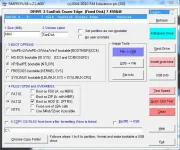
then Follow this Instructions,..
Select Your Flash Drive,
Then Tick the box
XP/Bart/PE bootable (NTDLR), FAT 32, & Boot as HDD (C:2PTNS)
then Last Tick #6 Prepare drive
http://phc.onl/#forbidden#/attachments/3-png.9062/
then tick OK,.
http://phc.onl/#forbidden#/attachments/4-png.9063/
Tick OK
http://phc.onl/#forbidden#/attachments/5-png.9064/
irereformat ng Application na gamit natin ang Flash Drive natin,..
http://phc.onl/#forbidden#/attachments/6-png.9065/
Now lagay na natin yung O.S. Tandaan lang po natin pag kakasunod sunod,..
remember? Xp muna ang 1st at Mounted or extracted dapat yung Image Files
http://phc.onl/#forbidden#/attachments/7-png.9066/
Next Windows seven Complete, Mounted Image din po dapat,.. Windows 7 complete na gamit ko andito na lahat,. ultimate,starter,home basic, etc. 4GB size nya sa windos 7 palang,.. so 8GB talaga recomend na gamiting Flash Dirve,.
http://phc.onl/#forbidden#/attachments/8-png.9067/
Then Eto po yung Huli Hiren Boot CD,. naka ISO image sya dapat at hindi mounted,.
http://phc.onl/#forbidden#/attachments/9-png.9068/
Napakalaking tulong po kasi ng Hiren sa ating mga technician lalo yung HDD Generator,
Para maiwasan natin yung sayang na Oras sa kaka Reformat then di nag Tutuloy?
HDD pala ang sira?
tuloy ulit natin,.. After mai-load ang mga OS,.. Tick na po natin ang GO,.
http://phc.onl/#forbidden#/attachments/10-png.9069/
Processing,.... Usually po 45mins to 1 Hour ang Process Dipende sa bilis ng PC nyo kaya wag tayo kabahan na mukang Di matatapos ang Process,..
Jobe Done,...! Pero di pa tapos ang trabaho
Testing muna natin,...
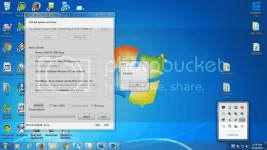
Pwede po natin matesting ang Bootable na FLash drive natin kahit di tayo Pumasok sa BIOS,.
ganito lang po Tick po natin ang Test in QEMU
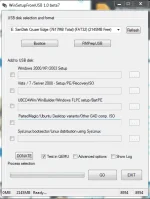
Then Eto po Lilitaw,.. ganito rin po mismo ang makikita natin pag naka boot na sya sa BIOS,.
Pili ka lang ng OS na gagamitin kahit yung HIREN pwede na,..
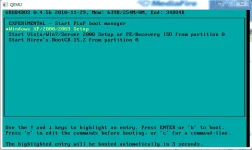
Proof,... Windos XP
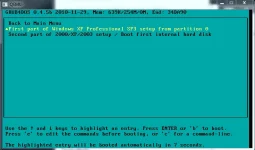
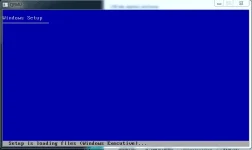
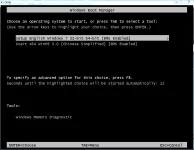
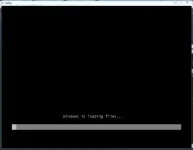
WINDOWS 7 nasa windows parin tayo ha? Testing lang,..
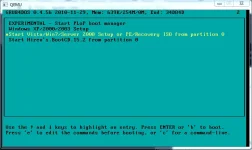
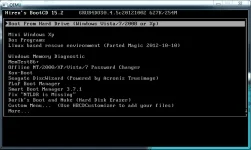
Last HIREN Boot CD
Done na po,.. Sana po makatulong sa inyo kahit sa Maliit na PAraan lamang po,..
Good Day po sa Inyo mga Sir/Madam,.
May ibabahagi po sana akong isang bagay na magagamit nating mga Technicians pag Dating sa Pag rereformat ng Laptop,Netbook, Or Even Desktop PC.
Madami po akong na search dito pero yung iba Tested? yung Iba hindi,. So Bilang Cp at PC Technicians,. Share ko po sa inyo ang Procedures nito,..
Ang laman po ng USB Bootable Flash Drive is Dalawang O.S. Windows XP, Windows 7 at Pwede natin Isama ang HYREN Boot CD na napakalaki rin ng naitutulong sa mga PC Technicians,.
Procedures lang po ang ise-share ko. If may OS kayo yun nalang po ang Gamitin nyo,.
So Eto po Yung Applications na gamit,..
WinSetup-1-0-beta7
You do not have permission to view the full content of this post. Log in or register now.
Extract nyo po yung Files Then Open nyo po yung exe files,
Then insert nyo na po yung Flash Drive na gagamitin nyo,. gamit ko po ay 8GB
Let's Start
http://phc.onl/#forbidden#/attachments/1-png.9060/
Pag na read na Flash Drive nyo Eto po gagawin natin,. Prepare natin yung Flash Drive,.
http://phc.onl/#forbidden#/attachments/2-png.9061/
Eto po lalabas after natin tick ang RMperUSB
then Follow this Instructions,..
Select Your Flash Drive,
Then Tick the box
XP/Bart/PE bootable (NTDLR), FAT 32, & Boot as HDD (C:2PTNS)
then Last Tick #6 Prepare drive
http://phc.onl/#forbidden#/attachments/3-png.9062/
then tick OK,.
http://phc.onl/#forbidden#/attachments/4-png.9063/
Tick OK
http://phc.onl/#forbidden#/attachments/5-png.9064/
irereformat ng Application na gamit natin ang Flash Drive natin,..
http://phc.onl/#forbidden#/attachments/6-png.9065/
Now lagay na natin yung O.S. Tandaan lang po natin pag kakasunod sunod,..
remember? Xp muna ang 1st at Mounted or extracted dapat yung Image Files
http://phc.onl/#forbidden#/attachments/7-png.9066/
Next Windows seven Complete, Mounted Image din po dapat,.. Windows 7 complete na gamit ko andito na lahat,. ultimate,starter,home basic, etc. 4GB size nya sa windos 7 palang,.. so 8GB talaga recomend na gamiting Flash Dirve,.
http://phc.onl/#forbidden#/attachments/8-png.9067/
Then Eto po yung Huli Hiren Boot CD,. naka ISO image sya dapat at hindi mounted,.
http://phc.onl/#forbidden#/attachments/9-png.9068/
Napakalaking tulong po kasi ng Hiren sa ating mga technician lalo yung HDD Generator,
Para maiwasan natin yung sayang na Oras sa kaka Reformat then di nag Tutuloy?
HDD pala ang sira?
tuloy ulit natin,.. After mai-load ang mga OS,.. Tick na po natin ang GO,.
http://phc.onl/#forbidden#/attachments/10-png.9069/
Processing,.... Usually po 45mins to 1 Hour ang Process Dipende sa bilis ng PC nyo kaya wag tayo kabahan na mukang Di matatapos ang Process,..
Jobe Done,...! Pero di pa tapos ang trabaho
Testing muna natin,...
Pwede po natin matesting ang Bootable na FLash drive natin kahit di tayo Pumasok sa BIOS,.
ganito lang po Tick po natin ang Test in QEMU
Then Eto po Lilitaw,.. ganito rin po mismo ang makikita natin pag naka boot na sya sa BIOS,.
Pili ka lang ng OS na gagamitin kahit yung HIREN pwede na,..
Proof,... Windos XP
WINDOWS 7 nasa windows parin tayo ha? Testing lang,..
Last HIREN Boot CD
Done na po,.. Sana po makatulong sa inyo kahit sa Maliit na PAraan lamang po,..