 PH
PHAnuny mouse
Journeyman
.
Top 15 Methods How häçkers Can häçk Facebook Accounts & How To Protect From Them?
BY You do not have permission to view the full content of this post. Log in or register now. · DECEMBER 18, 2016
Today we bring you a topic that is not so rare or new to all of you, but rather so common and I know most of you already know a thing or two about the topic but just don’t know it that good.
Despite the security concerns that have plagued Facebook for years, lots of people are still sticking around and millions join everyday. The scary part is some Facebook accounts are häçked, but the good thing is it doesn’t happen to everyone. Today, in this article I have outlined ways through which these malicious beings häçk Facebook accounts and preventive measures to help you safeguard against häçkers.
1. häçk Facebook account using key logging
Key logging is presumably the easiest way to häçk a Facebook account password. A key logger is a program that records the keystrokes on a computer. It does this by monitoring a user’s input and keeping a log of all keys that are entered. The log may be saved to a file or even at times sent to another machine over a network or the internet. Key logging is a very much cunning method that even people with extensive computer knowledge have fallen victim to it.
This is how you can avoid key loggers
2. häçk Facebook account password by phishing
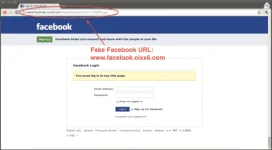
Phishing is a very popular method used for häçking Facebook accounts. Perhaps because its victims are always unsuspecting. However, there are various ways of carrying out a phishing attack. The most common one is where a häçker creates a replica of a login page which looks like the real Facebook page. The victim will then think it’s the usual login page therefore entering in his login details. Once the victim is logged in through the fake page, the victim’s email address and password are stored in a text file and it’s all done. The häçker has his prize. The login details.
How to avoid phishing;

3. häçk Facebook account password by session hijacking
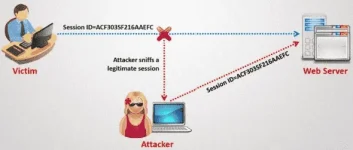
Session hijacking is where the häçker s†éáls the victim’s browser cookie which is used in authentication of the user on a website and after getting the cookie, the häçker can then access the victim’s account. Session hijacking is mostly common when accessing Facebook on an HTTP (non-secure) connection and it is widely used on LAN and Wi-Fi connections.
4. Saved passwords from browsers
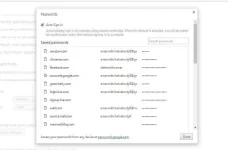
Most of us are fond of granting permission to our browsers to save our usernames and passwords on our devices be it a computer or smartphone.
Anyone can häçk your Facebook account from your browser’s password manager. Because of that never save your password on your device. For you may never know when the info will be hijacked.
How to avoid against hijacking
5. Sidejacking with firesheep
Firesheep is mostly used to carry out sidejacking attacks. However, firesheep only works when the attacker and victim are on the same Wi-Fi network. A sidejacking attack can similarly be looked at as HTTP session hijacking though it’s more directed towards Wi-Fi users.

6. You do not have permission to view the full content of this post. Log in or register now. häçking
As we all know, highest number of Facebook users access Facebook through their phone the häçker can gain access to the victims Facebook account. There exists many You do not have permission to view the full content of this post. Log in or register now. spying software. The most popular ones being mobile spy and spy phone gold. So better watch out.
How to safeguard yourself

7. DNS spoofing
With DNS spoofing, the häçker, if on the same network with the victim, can change the original page and replace it with his own fake page and easily gain access to the victims Facebook account.
How to safeguard against spoofing
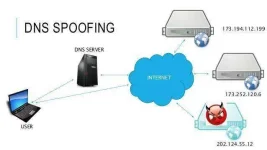
8. USB häçking
A häçker can get physical access to your computer and insert a USB programmed to automatically extract or retrieve saved passwords in the internet browser or any other information the häçker may need.
How to protect yourself;

9. Man in the middle attacks
With this method, it’s very tricky when the häçker and victim are on the same LAN and on a switch based network. The häçker places himself between the client and the server, or he could act as a default gateway and capture all the traffic in between.
How to safeguard against this
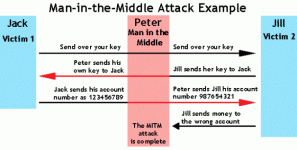
10. Botnets
Basically, botnets are networks made of remote controlled computers or bots. These bots have been infected with malware that allows them to be remotely controlled. It’s expensive to set up botnets and this makes them to be minimally used in cases of häçking Facebook accounts. Some very popular botnets include spyeye and zeus.
How to safeguard against botnets;
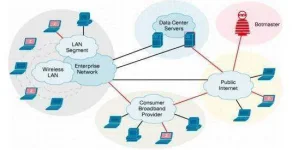
11. Social engineering
Social engineering is a simple method that’s based on collecting as much info from the victims as possible. The information may include date of birth, phone number, etc. once a häçker gains access to this info and somehow it’s the same info used as a password, then the häçker can get access into the Facebook account effortlessly.
How to avoid this
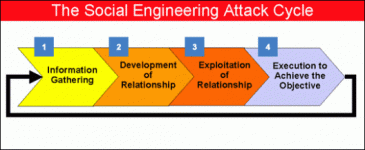
12. Email ID häçking
With this method, the häçker only needs to access the connected email id of any account and then reset the Facebook password manually.
How to avoid this
13. Viewing masked passwords
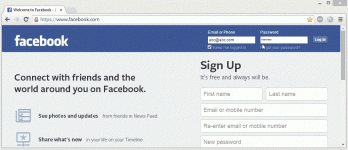
In You do not have permission to view the full content of this post. Log in or register now. your browser saves your Facebook login credentials. This means you are prone to being häçked by almost anyone since they can view your masked passwords (****). The häçker just needs to tweak a few set ups in the browser and he will gain access to your password eventually. This indicates that you should never leave your computer on a sign up page of any site. Also, never save your Facebook or other login credentials in the browser.
14. häçking Wi-Fi network
If you have a You do not have permission to view the full content of this post. Log in or register now., it’s better to set it up with a strong password. If you use a weak password to set up the router security, a häçker can häçk your Wi-Fi network and hijack all your internet traffic which can let eventually expose your Facebook account.
How to avoid this;

15. Logout
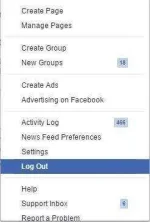
Unfortunately people love logging in but don’t like logging out. That’s why very many Facebook users never log out their Facebook accounts from their computer. With your Facebook account logged in, anyone can access your Facebook. Therefore, always endeavor to log out every time you are done using your account.
With all that information, I assume you will know how to protect your accounts better and safeguard from the malicious häçkers. If you have anything to add, please inform us in the comments section.
Copy/paste
Credetz to the owner of this blog..
Sana makatulong.
Top 15 Methods How häçkers Can häçk Facebook Accounts & How To Protect From Them?
BY You do not have permission to view the full content of this post. Log in or register now. · DECEMBER 18, 2016
Today we bring you a topic that is not so rare or new to all of you, but rather so common and I know most of you already know a thing or two about the topic but just don’t know it that good.
Despite the security concerns that have plagued Facebook for years, lots of people are still sticking around and millions join everyday. The scary part is some Facebook accounts are häçked, but the good thing is it doesn’t happen to everyone. Today, in this article I have outlined ways through which these malicious beings häçk Facebook accounts and preventive measures to help you safeguard against häçkers.
1. häçk Facebook account using key logging
Key logging is presumably the easiest way to häçk a Facebook account password. A key logger is a program that records the keystrokes on a computer. It does this by monitoring a user’s input and keeping a log of all keys that are entered. The log may be saved to a file or even at times sent to another machine over a network or the internet. Key logging is a very much cunning method that even people with extensive computer knowledge have fallen victim to it.
This is how you can avoid key loggers
- Scan your You do not have permission to view the full content of this post. Log in or register now. for virus
- Always download software from trusted sites
- Always maintain a good antivirus and internet security to avoid key loggers
2. häçk Facebook account password by phishing
Phishing is a very popular method used for häçking Facebook accounts. Perhaps because its victims are always unsuspecting. However, there are various ways of carrying out a phishing attack. The most common one is where a häçker creates a replica of a login page which looks like the real Facebook page. The victim will then think it’s the usual login page therefore entering in his login details. Once the victim is logged in through the fake page, the victim’s email address and password are stored in a text file and it’s all done. The häçker has his prize. The login details.
How to avoid phishing;
- Never login your Facebook account on other devices
- Use chrome since it identifies the phishing page
- Avoid emails that ask you to log into your Facebook account.
3. häçk Facebook account password by session hijacking
Session hijacking is where the häçker s†éáls the victim’s browser cookie which is used in authentication of the user on a website and after getting the cookie, the häçker can then access the victim’s account. Session hijacking is mostly common when accessing Facebook on an HTTP (non-secure) connection and it is widely used on LAN and Wi-Fi connections.
4. Saved passwords from browsers
Most of us are fond of granting permission to our browsers to save our usernames and passwords on our devices be it a computer or smartphone.
Anyone can häçk your Facebook account from your browser’s password manager. Because of that never save your password on your device. For you may never know when the info will be hijacked.
How to avoid against hijacking
- Never save login credentials on your browser
- Always use a strong password on your computer
5. Sidejacking with firesheep
Firesheep is mostly used to carry out sidejacking attacks. However, firesheep only works when the attacker and victim are on the same Wi-Fi network. A sidejacking attack can similarly be looked at as HTTP session hijacking though it’s more directed towards Wi-Fi users.
6. You do not have permission to view the full content of this post. Log in or register now. häçking
As we all know, highest number of Facebook users access Facebook through their phone the häçker can gain access to the victims Facebook account. There exists many You do not have permission to view the full content of this post. Log in or register now. spying software. The most popular ones being mobile spy and spy phone gold. So better watch out.
How to safeguard yourself
- Use trustworthy mobile security and You do not have permission to view the full content of this post. Log in or register now. on your phone
- Avoid installing apps from unknown sources
- Always uninstall suspicious apps
7. DNS spoofing
With DNS spoofing, the häçker, if on the same network with the victim, can change the original page and replace it with his own fake page and easily gain access to the victims Facebook account.
How to safeguard against spoofing
- Always configure it to be secure against cache poisoning
- Manage your DNS servers securely
- Separate the authoritative function from resolving function using different servers
8. USB häçking
A häçker can get physical access to your computer and insert a USB programmed to automatically extract or retrieve saved passwords in the internet browser or any other information the häçker may need.
How to protect yourself;
- Insert trusted USB devices into your computer
- Avoid sharing your computer
- Don’t purchase second hand USB devices
- Scan USB devices once plugged in
9. Man in the middle attacks
With this method, it’s very tricky when the häçker and victim are on the same LAN and on a switch based network. The häçker places himself between the client and the server, or he could act as a default gateway and capture all the traffic in between.
How to safeguard against this
- Use VPN services
- Use a proxy server to access the internet
- Use good You do not have permission to view the full content of this post. Log in or register now. with good firewall options
10. Botnets
Basically, botnets are networks made of remote controlled computers or bots. These bots have been infected with malware that allows them to be remotely controlled. It’s expensive to set up botnets and this makes them to be minimally used in cases of häçking Facebook accounts. Some very popular botnets include spyeye and zeus.
How to safeguard against botnets;
- Keep all your software up to date
- Use strong passwords and keep them secret
- Ensure that your firewall is always on
- Use You do not have permission to view the full content of this post. Log in or register now. cautiously
11. Social engineering
Social engineering is a simple method that’s based on collecting as much info from the victims as possible. The information may include date of birth, phone number, etc. once a häçker gains access to this info and somehow it’s the same info used as a password, then the häçker can get access into the Facebook account effortlessly.
How to avoid this
- Never share personal info via email or phone
- Avoid links from unknown or suspicious sites
- Block USB devices to minimize risk of baiting
12. Email ID häçking
With this method, the häçker only needs to access the connected email id of any account and then reset the Facebook password manually.
How to avoid this
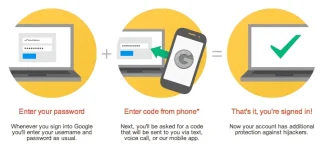
- Enable 2 step authentification in your Gmail account
- Use strong passwords
- Avoid entering email on scrupulous sites
13. Viewing masked passwords
In You do not have permission to view the full content of this post. Log in or register now. your browser saves your Facebook login credentials. This means you are prone to being häçked by almost anyone since they can view your masked passwords (****). The häçker just needs to tweak a few set ups in the browser and he will gain access to your password eventually. This indicates that you should never leave your computer on a sign up page of any site. Also, never save your Facebook or other login credentials in the browser.
14. häçking Wi-Fi network
If you have a You do not have permission to view the full content of this post. Log in or register now., it’s better to set it up with a strong password. If you use a weak password to set up the router security, a häçker can häçk your Wi-Fi network and hijack all your internet traffic which can let eventually expose your Facebook account.
How to avoid this;
- Avoid free Wi-Fi or public Wi-Fi
- Always use VPN to access Wi-Fi
- Always change your Wi-Fi password
15. Logout
Unfortunately people love logging in but don’t like logging out. That’s why very many Facebook users never log out their Facebook accounts from their computer. With your Facebook account logged in, anyone can access your Facebook. Therefore, always endeavor to log out every time you are done using your account.
With all that information, I assume you will know how to protect your accounts better and safeguard from the malicious häçkers. If you have anything to add, please inform us in the comments section.
Copy/paste
Credetz to the owner of this blog..
Sana makatulong.