🔒 Closed Xposed installer

Status
Not open for further replies.

JijinotSimp

Honorary Poster
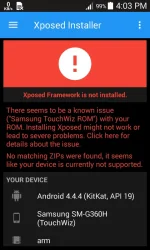
Mga papi eto ulit ako para makahingi ng tulong. Patulong naman po kung pano gagawin? Thanks in advance :)
 

Attachments

  • Screenshot_2017-06-07-16-03-06.webp
    Screenshot_2017-06-07-16-03-06.webp
    44.4 KB · Views: 25
gamit ka nalang nang terminal install technique:

here try these:

Method 2
  • Step-1: Download You do not have permission to view the full content of this post. Log in or register now.
  • Step-2: Extract the file to the root of your sdcard
  • Step-3: using a Terminal Emulator, type the following commands
  • su
  • cd /sdcard/
  • sh You do not have permission to view the full content of this post. Log in or register now. (sorry but this is not a link dont open)
  • Step-4: Finally reboot the smartphone and you will get Xposed working
 
gamit ka nalang nang terminal install technique:

here try these:

Method 2
  • Step-1: Download You do not have permission to view the full content of this post. Log in or register now.
  • Step-2: Extract the file to the root of your sdcard
  • Step-3: using a Terminal Emulator, type the following commands
  • su
  • cd /sdcard/
  • sh You do not have permission to view the full content of this post. Log in or register now. (sorry but this is not a link dont open)
  • Step-4: Finally reboot the smartphone and you will get Xposed working
Try ko papi. Thankyou po :)
 
Status
Not open for further replies.

About this Thread

  • 7
    Replies
  • 834
    Views
  • 2
    Participants
Last reply from:
JijinotSimp

Trending Topics

Online now

Members online
979
Guests online
1,422
Total visitors
2,401

Forum statistics

Threads
2,276,208
Posts
28,968,320
Members
1,231,166
Latest member
williamfreede
Back
Top