PH
PHFacebook is a platform which can help people connect, right? So what can be the purpose of having your location hidden on your posts?
Before going on with this, you need to understand the basics of posting. Whenever you post something, you are given the chance to initially include the following:
heres how to hide
- Some people might want better and sure security because identity theft and theft itself is rampant especially in the online world
- There are users who feel uncomfortable in sharing their location so they need to incur privacy and secrecy from their posts
Before going on with this, you need to understand the basics of posting. Whenever you post something, you are given the chance to initially include the following:
- You can tag the people included on your post, photo, or video
- You can include the emotion you are feeling or the emotion you are feeling towards what you have posted
- You can add the location by “checking in.”
heres how to hide
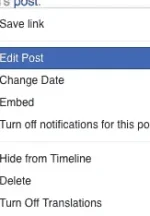
- Go to the status you have posted and click on the drop down arrow at the top right of the post.
- From the dropdown menu, select Edit Post.
- Click the location sign. The location sign is quite obvious; you will notice an arrow pointing downwards and that automatically announces that that is the location sign.
- You can Edit the location by selecting a new location and then click on
- You can then however click on the Edit Post button, click on the “x” at the right of the location to remove your current location and then hit on