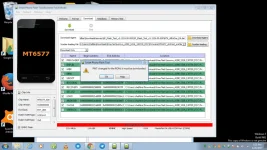
P phebzmolang Enthusiast Apr 29, 2017 #1 need help po.. anu po kaya maling nagawa ko.. ??? sana po may makatulong sakin... or may kulang po ba ???
need help po.. anu po kaya maling nagawa ko.. ??? sana po may makatulong sakin... or may kulang po ba ???
TS TS P phebzmolang Enthusiast Apr 29, 2017 #4 na try ko na po yung firmware upgrade at tama naman po yung firmware ko... kaso ayaw pa din po mag succed.
na try ko na po yung firmware upgrade at tama naman po yung firmware ko... kaso ayaw pa din po mag succed.
R Romneel Eternal Poster Apr 29, 2017 #5 how to fix error "PMT changed for the rom " on mt6582 sp flash tool tested on evertek everfancy III 1- go to format 2-auto flash format 3-start
how to fix error "PMT changed for the rom " on mt6582 sp flash tool tested on evertek everfancy III 1- go to format 2-auto flash format 3-start
R Romneel Eternal Poster Apr 29, 2017 #7 FIXING PMT CHANGED FOR THE ROM In SP Flash Tool interface, click Format tab Once in Format tab, click Start to format the phone Now go back to Download tab Load scatter file of the firmware you wish to flash Click Download and connect phone. Flashing should now commence.
FIXING PMT CHANGED FOR THE ROM In SP Flash Tool interface, click Format tab Once in Format tab, click Start to format the phone Now go back to Download tab Load scatter file of the firmware you wish to flash Click Download and connect phone. Flashing should now commence.
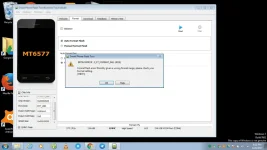
TS TS P phebzmolang Enthusiast Apr 29, 2017 #8 Romneel nagawa ko na po yan kanina ang nangyari naman po ay BROM ERROR....
S Shinsuke Nishizono Wimpy Kid Apr 29, 2017 #9 phebzmolang said: Romneel nagawa ko na po yan kanina ang nangyari naman po ay BROM ERROR.... Click to expand... Anong BROM Error Code yan?
phebzmolang said: Romneel nagawa ko na po yan kanina ang nangyari naman po ay BROM ERROR.... Click to expand... Anong BROM Error Code yan?
S Shinsuke Nishizono Wimpy Kid Apr 29, 2017 #11 phebzmolang said: MarcoDiaz ito po ohh.. View attachment 168358 Click to expand... Mali yung scatter file mo. Maghanap ka pa ng firmware. Then naalala mo ba na anong version yan? Example S102 , S108 , S208 ?
phebzmolang said: MarcoDiaz ito po ohh.. View attachment 168358 Click to expand... Mali yung scatter file mo. Maghanap ka pa ng firmware. Then naalala mo ba na anong version yan? Example S102 , S108 , S208 ?
TS TS P phebzmolang Enthusiast Apr 29, 2017 #12 MarcoDiaz yes po natandaan ko po yan.. at nag try na rin po akong maghanap ng ibang firmware para pang back up.. kaso lahat po ng na sesearch ko ay pare parehas lang po sila.. iisang firmware version lang po sila..
MarcoDiaz yes po natandaan ko po yan.. at nag try na rin po akong maghanap ng ibang firmware para pang back up.. kaso lahat po ng na sesearch ko ay pare parehas lang po sila.. iisang firmware version lang po sila..
S Shinsuke Nishizono Wimpy Kid Apr 29, 2017 #13 Try mo ito. You do not have permission to view the full content of this post. Log in or register now. Pang pilipinas na ng variant niyan. Kung ayaw pa rin. Definitely sira na ng emmc mo.
Try mo ito. You do not have permission to view the full content of this post. Log in or register now. Pang pilipinas na ng variant niyan. Kung ayaw pa rin. Definitely sira na ng emmc mo.
 PH
PH