 PH
PH-
Welcome to PHCorner Forums! Sign up for free to unlock full access and exclusive privileges, including:
- Asking questions about computer and mobile issues
- Discovering internet tips for your mobile network and computer
You are using an out of date browser. It may not display this or other websites correctly.
You should upgrade or use an alternative browser.
You should upgrade or use an alternative browser.
🔒 Closed Help shadowsocksr (can't access all site) help
- Thread starter Kirkyyy
- Start date
- Status
- Not open for further replies.
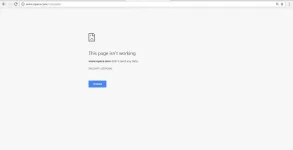
ginawan ko na po sir pero hindi parin e halos lahay na sigurong server ang ginamit ko hindi siya makaka acces ng site sa operamini for pcpalit ka ng server...

ginawa ko na pa yun pero hindi parin siya makaka access ng ibang sitespalit ka ng server...
hindi din ako makaka download ng IDM wala po akong idm okay naman yung port 1080check mo port ng browser mo at idm mo
Test all servers you have.
For browsing, set Shadowsocks mode to Global.
For downloading fast, set Shadowsocks mode to PAC.
Set proxy rule to: Bypass LAN or Bypass LAN & China.
For IDM settings go to "Options" then "Proxy/Socks" tab, Click "Get from IE" button and activate "Use automatic configuration script" and "Use proxy" and "Use this proxy for the following protocols" tabs.
IDM downloading tip: After clicking on the "download with IDM" button, don't click download yet. Minimize it and leave it for a while. Kahit di mo i-click and download button, nagda-download si IDM. If you click the download button later after a few minutes, you'll see na ilang megabytes na ang na-download. Try it.
For browsing, set Shadowsocks mode to Global.
For downloading fast, set Shadowsocks mode to PAC.
Set proxy rule to: Bypass LAN or Bypass LAN & China.
For IDM settings go to "Options" then "Proxy/Socks" tab, Click "Get from IE" button and activate "Use automatic configuration script" and "Use proxy" and "Use this proxy for the following protocols" tabs.
IDM downloading tip: After clicking on the "download with IDM" button, don't click download yet. Minimize it and leave it for a while. Kahit di mo i-click and download button, nagda-download si IDM. If you click the download button later after a few minutes, you'll see na ilang megabytes na ang na-download. Try it.
wala po akong idm kasi hindi ako makaka download kasi hindi ko ma access ang mga ibang sites pero salamat sa infoTest all servers you have.
For browsing, set Shadowsocks mode to Global.
For downloading fast, set Shadowsocks mode to PAC.
Set proxy rule to: Bypass LAN or Bypass LAN & China.
For IDM settings go to "Options" then "Proxy/Socks" tab, Click "Get from IE" button and activate "Use automatic configuration script" and "Use proxy" and "Use this proxy for the following protocols" tabs.
IDM downloading tip: After clicking on the "download with IDM" button, don't click download yet. Minimize it and leave it for a while. Kahit di mo i-click and download button, nagda-download si IDM. If you click the download button later after a few minutes, you'll see na ilang megabytes na ang na-download. Try it.

ultimas palavras
Forum Veteran
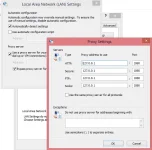
wala po akong idm okay naman yung port 1080 View attachment 167124
try mo muna e uncheck yang use proxy server , tsaka pakicheck mo rin sa browser mo yung connection niya .. wag mong gamitan ng manual proxy
THANK
s poTest all servers you have.
For browsing, set Shadowsocks mode to Global.
For downloading fast, set Shadowsocks mode to PAC.
Set proxy rule to: Bypass LAN or Bypass LAN & China.
For IDM settings go to "Options" then "Proxy/Socks" tab, Click "Get from IE" button and activate "Use automatic configuration script" and "Use proxy" and "Use this proxy for the following protocols" tabs.
IDM downloading tip: After clicking on the "download with IDM" button, don't click download yet. Minimize it and leave it for a while. Kahit di mo i-click and download button, nagda-download si IDM. If you click the download button later after a few minutes, you'll see na ilang megabytes na ang na-download. Try it.
sige po salamat try ko thankstry mo muna e uncheck yang use proxy server , tsaka pakicheck mo rin sa browser mo yung connection niya .. wag mong gamitan ng manual proxy
- Status
- Not open for further replies.
About this Thread
-
10Replies
-
960Views
-
6Participants
Last reply from:
Kirkyyy
Kirkyyy
New Topics
-
Suggest po Thesis Title or Topic for Mechanical Engineering
- Started by Jellycatbudo
- Replies: 0
- ❓ Internet Questions
-
How make single name in Facebook
- Started by sejann
- Replies: 0
- ❓ Internet Questions
-
Possible po kaya mapasok to?
- Started by Vexar
- Replies: 2
- ❓ Internet Questions
-
Facebook face ver failed, IG Deactivate
- Started by mhiemabhels
- Replies: 0
- ❓ Internet Questions
-
Paturo mga boss
- Started by austin817
- Replies: 2
- ❓ Internet Questions
-
Pahelp mga boss pahingi po ng pisofi image 4.8.8v for rasberry pi
- Started by ayeman
- Replies: 0
- ❓ Internet Questions
-
Pahelp po SheerID ng gemini
- Started by ambitiousnoob
- Replies: 0
- ❓ Internet Questions
-
Ask abt Gfiber prepaid
- Started by LeBlanc
- Replies: 0
- ❓ Internet Questions
-
Cctv camera (same wifi)
- Started by oneal_31
- Replies: 2
- ❓ Internet Questions
-
New User Here, Help me
- Started by jaleeebean
- Replies: 0
- ❓ Internet Questions
Trending Topics
Online now
- Members online
- 1,284
- Guests online
- 9,023
- Total visitors
- 10,307