 PH
PHAnnyeong
This is LadyClare
your tutor on how to make a basic .prx config
Requirements:
Brain.exe (since birth meron ka nito, gamitin lng ng maayos)
Postern App (apk provided below)
Basic .prx template (provided below)
shadowsocks account (links provided below)
notepad (PC) or ES File Explorer (Smartphones, apk provided below)
so lets start:
Download the basic .prx template
You do not have permission to view the full content of this post. Log in or register now.
Open the template,
(For PC)
use notepad
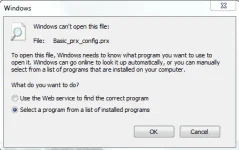
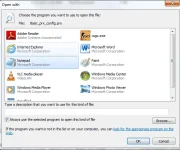
(For Smartphones)
Use ES File Explorer
You do not have permission to view the full content of this post. Log in or register now.
then change the .prx to .txt
it should be like this
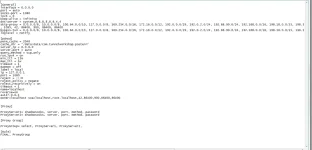
NEXT STEP
get Shadowsocks account
open this thread
https://phcorner.org/t/saan-kukuha-ng-aninomedyas.305377/
NOTE:
all sites have different expiration/reset time
when you got your desired accounts, lets go back to the template
on the Proxy tab, you should find this

change ProxyServer# to any Name you want
(it doesnt matter what name you put as long as it will not be duplicated)
shadowsocks should be as is, since we use shadowsocks accounts
server, proxy, method, password will be on the site of the ss accounts you opened
(it should be on this format so it will be recognized by postern)

If you want to create Proxy Groups like on my configs

You can create as many groups as you want
and thats all for the Basic .prx config
NEXT STEP
sa pinakababa ay
FINAL, ProxyGroup
kung anong pangalan ng ProxyGroup, yun ang ilagay nyo

LASTLY
Save nyo tapos change ang .txt to .prx
and try your config if working
NOTE:
di natin maiiwasan na mang-open/kumopya ng config pero sana magbigay din tayo ng
credits sa kanila, ilang minuto rin ginugol nila para magawa ito
wag niyo sabihin na nalimutan niyo pangalan nila, palusot lang kayo eh
simple lang naman magbigay credits
press @ followed by their username

shoutout to:
yobmeb22 , Joren007 , Milton64XD , Nash13 , SBKian20 , Master Hokage lll at marami pang iba
(comment na lang sa di nasali para edit ko na lang)
POSTERN
You do not have permission to view the full content of this post. Log in or register now.
Questions? Comment nalang
This is LadyClare
your tutor on how to make a basic .prx config
Requirements:
Brain.exe (since birth meron ka nito, gamitin lng ng maayos)
Postern App (apk provided below)
Basic .prx template (provided below)
shadowsocks account (links provided below)
notepad (PC) or ES File Explorer (Smartphones, apk provided below)
so lets start:
Download the basic .prx template
You do not have permission to view the full content of this post. Log in or register now.
Open the template,
(For PC)
use notepad
(For Smartphones)
Use ES File Explorer
You do not have permission to view the full content of this post. Log in or register now.
then change the .prx to .txt
it should be like this
NEXT STEP
get Shadowsocks account
open this thread
https://phcorner.org/t/saan-kukuha-ng-aninomedyas.305377/
NOTE:
all sites have different expiration/reset time
when you got your desired accounts, lets go back to the template
on the Proxy tab, you should find this
change ProxyServer# to any Name you want
(it doesnt matter what name you put as long as it will not be duplicated)
shadowsocks should be as is, since we use shadowsocks accounts
server, proxy, method, password will be on the site of the ss accounts you opened
(it should be on this format so it will be recognized by postern)
If you want to create Proxy Groups like on my configs
You can create as many groups as you want
and thats all for the Basic .prx config
NEXT STEP
sa pinakababa ay
FINAL, ProxyGroup
kung anong pangalan ng ProxyGroup, yun ang ilagay nyo
LASTLY
Save nyo tapos change ang .txt to .prx
and try your config if working
NOTE:
di natin maiiwasan na mang-open/kumopya ng config pero sana magbigay din tayo ng
credits sa kanila, ilang minuto rin ginugol nila para magawa ito
wag niyo sabihin na nalimutan niyo pangalan nila, palusot lang kayo eh
simple lang naman magbigay credits
press @ followed by their username
shoutout to:
yobmeb22 , Joren007 , Milton64XD , Nash13 , SBKian20 , Master Hokage lll at marami pang iba
(comment na lang sa di nasali para edit ko na lang)
POSTERN
You do not have permission to view the full content of this post. Log in or register now.
Questions? Comment nalang
 Thanks for mentioning me