 PH
PHTroubleshoot Keyboard Issues
Keyboard LAPTOP or DESKTOP not working
working but some key pad unresponsive/malfunction
Sa mga nakaka encounter po ng keyboard issues especially sa mga laptop users share ko lang
kaonti kong experience paano e fix with hardware and software
sa mga naka desktop kung ayaw gumana or not detected keyboard nyu
first thing to do is check keyboad connector mismo ang wire at ang mga port baka may damage na
tingnan ng maige para makita kung may problema
at sa gumagamit ng wireless check battery ng keyboard nyu kung malakas pa
at ang wireless radio baka sira din double check
kung may extra keyboard try agad palitan ang keyboard baka sera na mismo hardware internal components
sa mga laptop user naman very often ang some keys not working like h'j'a'or etc.
majority po may 3 reasons sa keyboard issue
one - sira na talaga keyboard or port issue for desktop
two - sa mga laptop kaya somekey not working maybe flex cable is damage
three - driver failure especially sa mga laptop
kung naitry nyu na lahat ng test sa itaas try nyo po sa ibaba last resource before deciding kung mag rereplace na talaga ng keyboard.
press window + R
type devmgmt.msc HIT ENTER
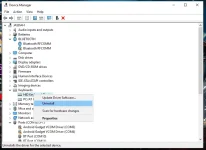
to run device manager drivers menu
see image below choose keyboard
at uninstall mo lahat ng keyboard drivers
then restart your device
dont worry automatic e update ng windows and keyboard drivers mo
without internet connection. then observe mo if working naba yung key board mo
at nag wowork naba ung unresponsive keys
GOOD LUCK!!!
Keyboard LAPTOP or DESKTOP not working
working but some key pad unresponsive/malfunction
Sa mga nakaka encounter po ng keyboard issues especially sa mga laptop users share ko lang
kaonti kong experience paano e fix with hardware and software
sa mga naka desktop kung ayaw gumana or not detected keyboard nyu
first thing to do is check keyboad connector mismo ang wire at ang mga port baka may damage na
tingnan ng maige para makita kung may problema
at sa gumagamit ng wireless check battery ng keyboard nyu kung malakas pa
at ang wireless radio baka sira din double check
kung may extra keyboard try agad palitan ang keyboard baka sera na mismo hardware internal components
sa mga laptop user naman very often ang some keys not working like h'j'a'or etc.
majority po may 3 reasons sa keyboard issue
one - sira na talaga keyboard or port issue for desktop
two - sa mga laptop kaya somekey not working maybe flex cable is damage
three - driver failure especially sa mga laptop
kung naitry nyu na lahat ng test sa itaas try nyo po sa ibaba last resource before deciding kung mag rereplace na talaga ng keyboard.
press window + R
type devmgmt.msc HIT ENTER
to run device manager drivers menu
see image below choose keyboard
at uninstall mo lahat ng keyboard drivers
then restart your device
dont worry automatic e update ng windows and keyboard drivers mo
without internet connection. then observe mo if working naba yung key board mo
at nag wowork naba ung unresponsive keys
GOOD LUCK!!!