🔒 Closed Patulong!

Status
Not open for further replies.

Netflix

Forum Veteran
upload_2017-3-10_6-58-44.webp


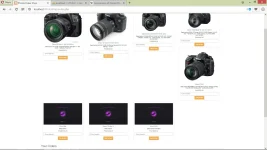
bakit po ganyan?? :(


Code:
<div class="container" style="width:70%;">
    <h2 align="center">Photo/Video Shop</h2>
    <?php
    $query = "SELECT * FROM products ORDER BY id ASC";
    $result = mysqli_query($connect, $query);
    if(mysqli_num_rows($result) > 0)
    {
        while($row = mysqli_fetch_array($result))
        {
            ?>
            <div class="col-md-3">
            <form method="post" action="shop.php?action=add&id=<?php echo $row["id"]; ?>">
            <div style="border: 1px solid #eaeaec; margin: -1px 19px 3px -1px; box-shadow: 0 1px 2px rgba(0,0,0,0.05); padding:10px;" align="center">
            <img src="<?php echo $row["image"]; ?>" class="img-responsive">
            <h5 class="text-info"><?php echo $row["p_name"]; ?></h5>
            <h5 class="text-default">Description:<?php echo $row["description"]; ?>
            <h5 class="text-danger">Php<?php echo $row["price"]; ?></h5></h5>
            <input type="text" name="quantity" class="form-control" value="" placeholder="Enter Quantity"><script>
                if (quantity)
            </script>
            <input type="hidden" name="hidden_name" value="<?php echo $row["p_name"]; ?>">
            <input type="hidden" name="hidden_price" value="<?php echo $row["price"]; ?>">
            <input type="submit" name="add" style="margin-top:5px;" class="btn btn-warning" value="Add to Cart">
            <!--Another row of camsss-->

            </div>
            </form>
            </div>
 
boss ang bootstrap ay may 12 column grid system. ang ginawa mo eh col-md-3. ibig sabihin ang maximum item/image ay 4. kasi 3x4 =12. ganyan nangyayari pag lumalampas ka sa 12 column grid system. try mong limit yung yung select query from the database by 4 sigurado ako sakto yan
 
boss ang bootstrap ay may 12 column grid system. ang ginawa mo eh col-md-3. ibig sabihin ang maximum item/image ay 4. kasi 3x4 =12. ganyan nangyayari pag lumalampas ka sa 12 column grid system. try mong limit yung yung select query from the database by 4 sigurado ako sakto yan


Boss san ko po ilalagay dito?
$query = "SELECT * FROM products ORDER BY id ASC";
$result = mysqli_query($connect, $query);
if(mysqli_num_rows($result) > 0)
 
Boss san ko po ilalagay dito?
$query = "SELECT * FROM products ORDER BY id ASC";
$result = mysqli_query($connect, $query);
if(mysqli_num_rows($result) > 0)

Walang problema sa grid system mo bro. Ang problema jan yung consistency nung mga height ng item mo. gawin mong fixed height per item mo. Mag specify ka na height na pare pareho sila for consistency. Fluid design kasi mga container na yan
 
Walang problema sa grid system mo bro. Ang problema jan yung consistency nung mga height ng item mo. gawin mong fixed height per item mo. Mag specify ka na height na pare pareho sila for consistency. Fluid design kasi mga container na yan
You mean sa mismong css ng bootstrap ko.. papalitan ko ang attribute ng height??

--
Or sa resolution yan ng mga pictures na ininsert ko ??
 
You mean sa mismong css ng bootstrap ko.. papalitan ko ang attribute ng height??

--
Or sa resolution yan ng mga pictures na ininsert ko ??

Code:
<style>
.col-md-3 .sales-item {
 min-height: [specify fixed height here];
 height: [specify height]
}

</style>
<div class="container" style="width:70%;">
   <h2 align="center">Photo/Video Shop</h2>
   <?php
   $query = "SELECT * FROM products ORDER BY id ASC";
   $result = mysqli_query($connect, $query);
   if(mysqli_num_rows($result) > 0)
   {
       while($row = mysqli_fetch_array($result))
       {
           ?>
           <div class="col-md-3 sales-item"> // LAGAY MO DITO YUNG 'sales item' NA CLASS NAME
           <form method="post" action="shop.php?action=add&id=<?php echo $row["id"]; ?>">
           <div style="border: 1px solid #eaeaec; margin: -1px 19px 3px -1px; box-shadow: 0 1px 2px rgba(0,0,0,0.05); padding:10px;" align="center">
           <img src="<?php echo $row["image"]; ?>" class="img-responsive">
           <h5 class="text-info"><?php echo $row["p_name"]; ?></h5>
           <h5 class="text-default">Description:<?php echo $row["description"]; ?>
           <h5 class="text-danger">Php<?php echo $row["price"]; ?></h5></h5>
           <input type="text" name="quantity" class="form-control" value="" placeholder="Enter Quantity"><script>
               if (quantity)
           </script>
           <input type="hidden" name="hidden_name" value="<?php echo $row["p_name"]; ?>">
           <input type="hidden" name="hidden_price" value="<?php echo $row["price"]; ?>">
           <input type="submit" name="add" style="margin-top:5px;" class="btn btn-warning" value="Add to Cart">
           <!--Another row of camsss-->

           </div>
           </form>
           </div>

Yes sa css mo lang yan. Yung buong container mismo ng item. gawin mo fixed height sila.
 
Code:
<style>
.col-md-3 .sales-item {
 min-height: [specify fixed height here];
 height: [specify height]
}

</style>
<div class="container" style="width:70%;">
   <h2 align="center">Photo/Video Shop</h2>
   <?php
   $query = "SELECT * FROM products ORDER BY id ASC";
   $result = mysqli_query($connect, $query);
   if(mysqli_num_rows($result) > 0)
   {
       while($row = mysqli_fetch_array($result))
       {
           ?>
           <div class="col-md-3 sales-item"> // LAGAY MO DITO YUNG 'sales item' NA CLASS NAME
           <form method="post" action="shop.php?action=add&id=<?php echo $row["id"]; ?>">
           <div style="border: 1px solid #eaeaec; margin: -1px 19px 3px -1px; box-shadow: 0 1px 2px rgba(0,0,0,0.05); padding:10px;" align="center">
           <img src="<?php echo $row["image"]; ?>" class="img-responsive">
           <h5 class="text-info"><?php echo $row["p_name"]; ?></h5>
           <h5 class="text-default">Description:<?php echo $row["description"]; ?>
           <h5 class="text-danger">Php<?php echo $row["price"]; ?></h5></h5>
           <input type="text" name="quantity" class="form-control" value="" placeholder="Enter Quantity"><script>
               if (quantity)
           </script>
           <input type="hidden" name="hidden_name" value="<?php echo $row["p_name"]; ?>">
           <input type="hidden" name="hidden_price" value="<?php echo $row["price"]; ?>">
           <input type="submit" name="add" style="margin-top:5px;" class="btn btn-warning" value="Add to Cart">
           <!--Another row of camsss-->

           </div>
           </form>
           </div>

Yes sa css mo lang yan. Yung buong container mismo ng item. gawin mo fixed height sila.
Got it boss.. Salamat ! :D
 
Status
Not open for further replies.

About this Thread

  • 19
    Replies
  • 612
    Views
  • 12
    Participants
Last reply from:
Impostor Syndrome

Trending Topics

Online now

Members online
1,140
Guests online
1,046
Total visitors
2,186

Forum statistics

Threads
2,273,968
Posts
28,952,742
Members
1,235,011
Latest member
jhonrey30
Back
Top