 PH
PHXena Gabrielle
Eternal Poster
Godmode means you can control all things from a single click. Godmode in the window gives you the ability to control all settings, features and all other important from a single place.
Mean you can see all control panel settings in a single folder, that’s a really good for every pro-internet user.
If you enable God Mode in windows you can see all control panel settings and shortcuts in one folder. This häçk was first revealed in 2007 and works with all windows versions like window 7, window 8 and also on window 10.
How to Enable or Activate God Mode in Window 7, 8 and 10
This trick works in all Window versions including 32 and 64 Bit. So don’t worry if you run Window 10 in your PC and want this trick in your OS.
ENJOY
Mean you can see all control panel settings in a single folder, that’s a really good for every pro-internet user.
If you enable God Mode in windows you can see all control panel settings and shortcuts in one folder. This häçk was first revealed in 2007 and works with all windows versions like window 7, window 8 and also on window 10.
How to Enable or Activate God Mode in Window 7, 8 and 10
- Make a New Folder in Your Desktop.
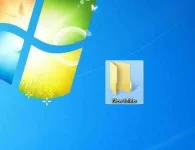
Make a New Folder
- Then rename the New Folder to GodMode.{ED7BA470-8E54-465E-825C-99712043E01C}
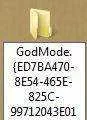
Rename it to Godmode
- Enjoy God Mode in Your Window PC.
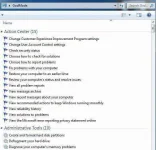
God Mode in Window 7
This trick works in all Window versions including 32 and 64 Bit. So don’t worry if you run Window 10 in your PC and want this trick in your OS.
ENJOY
 Credits ? Kanino ?