 PH
PH-
Welcome to PHCorner Forums! Sign up for free to unlock full access and exclusive privileges, including:
- Asking questions about computer and mobile issues
- Discovering internet tips for your mobile network and computer
You are using an out of date browser. It may not display this or other websites correctly.
You should upgrade or use an alternative browser.
You should upgrade or use an alternative browser.
- Status
- Not open for further replies.
t h i n k s t e r
Forum Guru
Ano po yung name ng installer nyo?
try nyo rin "run as admin"
try nyo rin "run as admin"
zkrittlez_1337
Forum Veteran
You do not have permission to view the full content of this post.
Log in or register now. Might Help 
Ano po yung name ng installer nyo?
try nyo rin "run as admin"
2captchabot po and sa printer installer naka lagay sa cd
t h i n k s t e r
Forum Guru
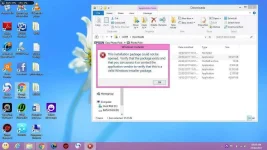
This is a Windows error and indicates a problem with either:
- The downloaded file
- You are not logged in with administrator rights
- The Windows Installer itself
- Corrupted system files
The first thing to try is to delete the file you have already downloaded and download the file again. If you chose to 'Run' the file then clear out all temporary files before you do this (Ctrl+Shift+Del).
If the above does not work then follow these steps and try to install after each step.
Step 1:
Try to ensure that Windows Installer service is running.
Go to Start and click on Control Panel.
Go to Administrative Tools.
Click on Services and scroll to Windows Installer.
Double click to bring up the service.
Check to see if the startup type is set to Manual.
Service status is usually stopped. Try and start the Windows Installer service.
Step 2:
Click Start, and in the start search box, type cmd.
Then right click and select, ‘Run as Administrator’.
At the command prompt, type:
- Type msiexec.exe /unregister, and then press ENTER.
- Type msiexec.exe /regserver, and then press ENTER.
Step 3:
If that doesn't help, then let's run System File checker to see if you have any corrupted system files.
Click Start
Type: CMD, from the results, right click CMD
Click 'Run as Administrator'.
At the Command Prompt, type: sfc /scannow
This will check for any integrity violations and fix any corrupted operating system files.
Restart your system.
Credit to Bet Angel
- The downloaded file
- You are not logged in with administrator rights
- The Windows Installer itself
- Corrupted system files
The first thing to try is to delete the file you have already downloaded and download the file again. If you chose to 'Run' the file then clear out all temporary files before you do this (Ctrl+Shift+Del).
If the above does not work then follow these steps and try to install after each step.
Step 1:
Try to ensure that Windows Installer service is running.
Go to Start and click on Control Panel.
Go to Administrative Tools.
Click on Services and scroll to Windows Installer.
Double click to bring up the service.
Check to see if the startup type is set to Manual.
Service status is usually stopped. Try and start the Windows Installer service.
Step 2:
Click Start, and in the start search box, type cmd.
Then right click and select, ‘Run as Administrator’.
At the command prompt, type:
- Type msiexec.exe /unregister, and then press ENTER.
- Type msiexec.exe /regserver, and then press ENTER.
Step 3:
If that doesn't help, then let's run System File checker to see if you have any corrupted system files.
Click Start
Type: CMD, from the results, right click CMD
Click 'Run as Administrator'.
At the Command Prompt, type: sfc /scannow
This will check for any integrity violations and fix any corrupted operating system files.
Restart your system.
Credit to Bet Angel
Try ko gawin thanks sa info
This is a Windows error and indicates a problem with either:
- The downloaded file
- You are not logged in with administrator rights
- The Windows Installer itself
- Corrupted system files
The first thing to try is to delete the file you have already downloaded and download the file again. If you chose to 'Run' the file then clear out all temporary files before you do this (Ctrl+Shift+Del).
If the above does not work then follow these steps and try to install after each step.
Step 1:
Try to ensure that Windows Installer service is running.
Go to Start and click on Control Panel.
Go to Administrative Tools.
Click on Services and scroll to Windows Installer.
Double click to bring up the service.
Check to see if the startup type is set to Manual.
Service status is usually stopped. Try and start the Windows Installer service.
Step 2:
Click Start, and in the start search box, type cmd.
Then right click and select, ‘Run as Administrator’.
At the command prompt, type:
- Type msiexec.exe /unregister, and then press ENTER.
- Type msiexec.exe /regserver, and then press ENTER.
Step 3:
If that doesn't help, then let's run System File checker to see if you have any corrupted system files.
Click Start
Type: CMD, from the results, right click CMD
Click 'Run as Administrator'.
At the Command Prompt, type: sfc /scannow
This will check for any integrity violations and fix any corrupted operating system files.
Restart your system.
Credit to Bet Angel
t h i n k s t e r
Forum Guru
Ung sa windows installer servicesTry ko gawin thanks sa info
check mo kung naka set sa stop i-start mo lang
- Status
- Not open for further replies.
Similar threads
-
❓ Help Pahelp po dito winusb lagi nag error
- Started by PHC - JOSHIE
- Replies: 0
About this Thread
-
7Replies
-
402Views
-
4Participants
Last reply from:
t h i n k s t e r
t h i n k s t e r
New Topics
-
SmartPLS pas source naman po
- Started by Unclear
- Replies: 0
- ❓ Computer Discussion & Support
-
Pc no device found
- Started by ashura12
- Replies: 0
- ❓ Computer Discussion & Support
-
INTERNATIONAL WEBINAR AND 2 LOCAL SEMINAR
- Started by PHC-JIA
- Replies: 0
- ❓ Computer Discussion & Support
-
Door Lock Keycard SDK
- Started by Porky Chao Fan
- Replies: 0
- ❓ Computer Discussion & Support
-
Counter strike sa mac
- Started by AYuna23
- Replies: 0
- ❓ Computer Discussion & Support
-
Booting Issue - FA506NFR
- Started by Impossible
- Replies: 0
- ❓ Computer Discussion & Support
-
Acrobat Pro DC ρá†ch. Need Help
- Started by skullkrasher99
- Replies: 3
- ❓ Computer Discussion & Support
-
Enlighten me please with these two
- Started by Jeii
- Replies: 4
- ❓ Computer Discussion & Support
Trending Topics
Online now
- Members online
- 1,095
- Guests online
- 9,363
- Total visitors
- 10,458