 PH
PHlonewolfentertainments
Enthusiast
Spotify Music downloader. High Quality Music.
Download whole album from spotify
Download whole artist discography from spotify
Download your personal/favorite playlist fromspotify
You do not have permission to view the full content of this post. Log in or register now.
STEPS FOR INSTALLING
1. download You do not have permission to view the full content of this post. Log in or register now.
2. unzip files and install sidify music converter
3. run Sidify Music Converter crack
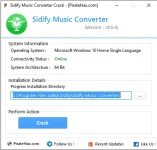
4. Locate the installation folder for sidify music converter then click Crack. Done.
STEPS FOR DOWNLOADING HIGH QUALITY
1. Open spotify and slidify music converter
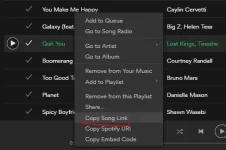
2. Select the song/playlist/album you want to download and right click
3. click copy song/playlist/album link
4. go to slidify music converter and click the plus button or the "Add audio" button.
5. Paste the link in the input box and click "Add"
6. wait for it to load then click "ok"
7. you can add more to the download list by repeating Steps 3 to 6
8. Click Convert and wait for it to finish downloading.
9. Enjoy.
NOTE!
1. Click the settings and select Conversion mode to "Spotify Record" for best quality
2. You can change the output folder
Download whole album from spotify
Download whole artist discography from spotify
Download your personal/favorite playlist fromspotify
You do not have permission to view the full content of this post. Log in or register now.
STEPS FOR INSTALLING
1. download You do not have permission to view the full content of this post. Log in or register now.
2. unzip files and install sidify music converter
3. run Sidify Music Converter crack
4. Locate the installation folder for sidify music converter then click Crack. Done.
STEPS FOR DOWNLOADING HIGH QUALITY
1. Open spotify and slidify music converter
2. Select the song/playlist/album you want to download and right click
3. click copy song/playlist/album link
4. go to slidify music converter and click the plus button or the "Add audio" button.
5. Paste the link in the input box and click "Add"
6. wait for it to load then click "ok"
7. you can add more to the download list by repeating Steps 3 to 6
8. Click Convert and wait for it to finish downloading.
9. Enjoy.
NOTE!
1. Click the settings and select Conversion mode to "Spotify Record" for best quality
2. You can change the output folder