 PH
Hi PHCorner! If calls or games keep dropping, this is a quick Windows check you can run while the problem is happening.
1. Open Command Prompt and run ipconfig. Find the IPv4 Default Gateway for the adapter you’re using. Run ping -n 30 YOUR_GATEWAY, replacing YOUR_GATEWAY with that address.
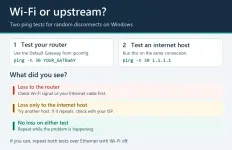
2. On the same connection, run ping -n 30 1.1.1.1. Check the packet-loss percentage at the end of each test. If you have an Ethernet cable, turn off Wi-Fi and repeat both tests over the cable.
If ping to the router drops only on Wi-Fi, start with the wireless signal. If the router replies normally but the internet host keeps dropping packets, try a second host before calling your ISP. Some hosts limit ping replies, so one result can be misleading.
If you try it, what did you get? “Wi-Fi / Ethernet | gateway loss % | internet loss %” is enough.
1. Open Command Prompt and run ipconfig. Find the IPv4 Default Gateway for the adapter you’re using. Run ping -n 30 YOUR_GATEWAY, replacing YOUR_GATEWAY with that address.
2. On the same connection, run ping -n 30 1.1.1.1. Check the packet-loss percentage at the end of each test. If you have an Ethernet cable, turn off Wi-Fi and repeat both tests over the cable.
If ping to the router drops only on Wi-Fi, start with the wireless signal. If the router replies normally but the internet host keeps dropping packets, try a second host before calling your ISP. Some hosts limit ping replies, so one result can be misleading.
If you try it, what did you get? “Wi-Fi / Ethernet | gateway loss % | internet loss %” is enough.