 PH
PremiumCourses
Eternal Poster
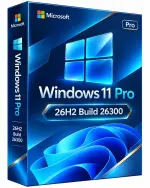
Free Download Windows 11 Pro 26H2 Build 26300.9974 Preactivated Multilingual November 2026 | 6.44 GB
Windows 11 Pro is a desktop operating system designed for productivity, security, and modern computing environments. It combines an updated user interface with built-in management tools, multitasking features, and compatibility with a wide range of Windows applications and hardware.
This customized release is based on Windows 11 Pro 26H2 and comes preactivated, with TPM requirements bypassed to support installation on systems that do not meet the standard TPM requirement. It includes multiple language options and incorporates the November 2026 build provided in this release.
Software Overview
Windows 11 version 26H2 builds on the servicing foundation shared with Windows 11 versions 24H2 and 25H2. Rather than introducing an entirely separate platform, this release enables selected capabilities delivered through previous monthly updates and establishes a new support lifecycle.
Eligible devices running supported earlier versions can receive 26H2 through an enablement package, which activates the relevant features with a relatively small download and typically one restart. This particular distribution is a customized installation image with preactivation and TPM bypass modifications.
The release includes improvements to Windows settings backup, taskbar interactions, and File Explorer. These updates aim to make everyday system management and navigation more convenient for both individual users and organizations.
Key Features
- Windows 11 Pro 26H2: Based on Microsoft's Windows 11 Pro platform and the November 2026 build supplied in this release.
- Preactivated Installation: Distributed with preactivation enabled.
- No TPM Requirement: Modified to bypass the standard TPM installation requirement.
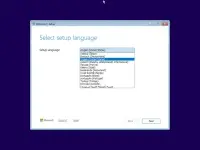
- Multilingual Interface: Includes Arabic, English, German, Greek, French, Spanish, Italian, Portuguese (Portugal), Portuguese (Brazil), Turkish, Dutch, Czech, and Norwegian.
- Windows Settings Backup: Enables backup of supported Windows settings and Microsoft Store app lists on eligible commercial devices.
- Taskbar Actions: Supports app-specific actions that provide direct access to common application tasks from the taskbar.
- File Explorer Improvements: Includes usability and navigation enhancements delivered through Windows servicing updates.
- Enablement Package Updates: Eligible systems running supported earlier releases can activate 26H2 features through a smaller enablement package.
- Shared Servicing Foundation: Uses the common servicing platform shared with Windows 11 versions 24H2 and 25H2.
- Professional Edition: Provides the Windows 11 Pro environment for professional and business-oriented computing.
Windows 11 Pro 26H2 brings together the latest platform improvements and familiar Windows productivity features. Its shared servicing foundation helps simplify updates for eligible devices, while enhancements to backup, taskbar interactions, and File Explorer improve everyday usability.
This customized edition may be useful for users whose computers do not meet the standard TPM installation requirement. However, bypassing hardware requirements does not guarantee that every unsupported device will receive the same level of compatibility, performance, or update support as an officially supported system.
System Requirements
- Processor: 2 GHz or faster
- Memory: 2 GB RAM
- Storage: 15 GB available hard-disk space
- Graphics: DirectX 9-compatible graphics device or newer
- Touch Support: A multitouch-compatible tablet or monitor is required for touch functionality.
- Internet Connection: Required to access the Microsoft Store and download or run certain applications.
- Display Resolution: At least 1024 x 768 pixels for Microsoft Store access.
This is a modified, preactivated Windows distribution rather than an unmodified installation image supplied directly by Microsoft. TPM bypass modifications do not remove all Windows 11 hardware requirements or guarantee compatibility with every computer.
The listed minimum requirements are lower than Microsoft's standard requirements for officially supported Windows 11 installations. Check hardware compatibility, driver availability, and backup important data before installing. Modified or unsupported installations may have limitations involving updates, security, and system stability.
FAQ
What is Windows 11 Pro 26H2?
It is the 26H2 feature release of Windows 11 Pro, built on the servicing foundation shared with versions 24H2 and 25H2.
Does this release require TPM?
The supplied installation image is modified to bypass the standard TPM requirement. This does not guarantee compatibility with every unsupported computer.
Is Windows 11 Pro 26H2 preactivated?
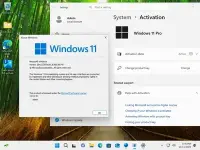
Yes. The release description identifies this customized distribution as preactivated.
Which languages are included?
Arabic, English, German, Greek, French, Spanish, Italian, Portuguese (Portugal), Portuguese (Brazil), Turkish, Dutch, Czech, and Norwegian.
Can I install this version over Windows 11 25H2?
Eligible systems using Microsoft's supported servicing path can move to 26H2 through an enablement package. This customized ISO may follow a different installation process, so check its installation instructions before upgrading.
Homepage
Code:
https://microsoft.com- Software Name: Windows 11 Pro
- Version: 26H2 Build 26300.9974
- Architecture: x64
- Languages: Arabic, English, German, Greek, French, Spanish, Italian, Portuguese (Portugal), Portuguese (Brazil), Turkish, Dutch, Czech, Norwegian
- License type: Pre-activated
- File Size: 6.44 GB

Download ( Rapidgator )
You do not have permission to view the full content of this post. Log in or register now.