PH
DanMachina
Grasshopper

| Title | Pokémon Legends: Z-A |
|---|---|
| Release Date | Oct 16, 2025 |
| Category | You do not have permission to view the full content of this post. Log in or register now., You do not have permission to view the full content of this post. Log in or register now. |
| Publisher | You do not have permission to view the full content of this post. Log in or register now. |
| Type | eShop |
| Format | NSP |
| Title ID | 0100F43008C44000 |
| Title Size | 4.02 GB |
| Language | En, Ja, Es, Fr, De, It, Ko, Zh, Tw |
| Required Firmware | 20.3.0.0 |
| CFW | 20.3.0.0 + Atmosphere 1.9.1 |
Download the Emulator Here:
You do not have permission to view the full content of this post. Log in or register now. (32.5MB)
Note: For windows choose MSVC zip
Download Prod.Keys and Firmware:
You do not have permission to view the full content of this post. Log in or register now. (6.21 KB)
You do not have permission to view the full content of this post. Log in or register now. (324.65 MB)
Download the Rom:
You do not have permission to view the full content of this post. Log in or register now. You do not have permission to view the full content of this post. Log in or register now.(4.1 GB)
Notes on downloading make sure to check first the size of the file before downloading it.
Installation Guide:
1. Extract Eden-Windows-a594c8d60e-amd64-msvc-standard
2. Open eden.exe file
3. Go to tools Install Decryption Keys
4. Open Prod.Keys file
5. Go to tools Install Firmware then Open Downloaded Firmware
6. Go to File and then Load File
7. Open Pokemon Legends Z-A .NSP ROM
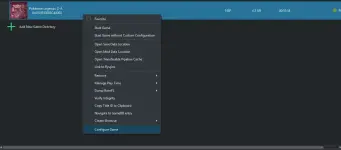
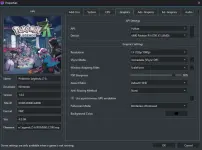
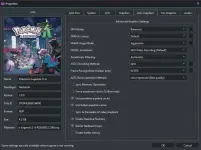
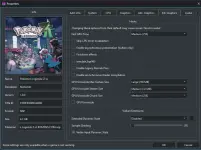
BLACK SCREEN SETTINGS GUIDE:
ENJOY!!!