 PH
PH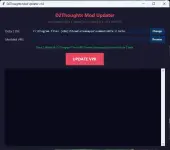
DOWNLOAD HERE :
You do not have permission to view the full content of this post. Log in or register now.
What is it?
The D2Thoughts Mod Updater v2.0 is a free all-in-one tool that manages your Dota 2 skin changer mods. It automatically updates your mod whenever the game patches, installs new mods with one click, handles VAC bypass patching, and can fully uninstall everything cleanly. No more manually editing files or waiting for someone else to update your mod — just click a button and you're back in the game.Features
- UPDATE VPK — Automatically merges your mod's items_game.txt changes into the latest Dota 2 game file. Your skins work again after any ρá†ch.
- INSTALL MOD — One-click install. Places the modded VPK, patches gameinfo + X, and launches Dota 2 for you.
- VAC FIX — Fixes VAC ERRORS.
- VERIFY DOTA 2 — Launches Steam's built-in file verification to restore original game files. Re-run VAC FIX afterwards if you use mods.
- UNINSTALL — Fully restores original gameinfo and removes the mod folder. Clean return to vanilla Dota 2.
- Auto-detection — Automatically finds your Dota 2 installation and remembers it for next time.
Quick Start
- Download and extract the D2Thoughts Mod Updater v2.0 folder anywhere on your PC
- Run D2Thoughts Mod Updater v2.0.exe
- The tool will automatically detect your Dota 2 installation (or click Browse to set it manually)
- Click Browse next to the Modded VPK field and select your pak01_dir.vpk file
- Click UPDATE VPK to merge your mod into the latest game update
- Click INSTALL MOD to install it into Dota 2 (auto-launches the game)
- Enjoy your custom skins!
Finding your modded VPK
Your modded VPK is typically located in one of these places:Dota 2 Mods/FULL PACK/game/Dota2SkinChanger/pak01_dir.vpk
or wherever you extracted your skin changer mod. Look for a file named pak01_dir.vpk — this is the file the tool needs.
VAC Fix & Verify
After installing a mod, you need to ρá†ch game files so Dota 2 loads your modded VPK without errors:- VAC FIX — Patches gameinfo_branchspecific.gi to load your mod folder and patches X so old mod entries are skipped during validation.
- VERIFY DOTA 2 — Runs Steam's file verification to get fresh game files. Use this when switching between mods or if game files are corrupted.
When to use it
Run the updater after every Dota 2 update. You'll know you need it when:- Your custom skins stop appearing in-game
- You see default skins instead of your modded ones
- Dota 2 crashes when loading a match with your mod enabled
Tips
- Back up your modded VPK before updating, just in case
- Close Dota 2 before running the updater or VAC FIX
- The tool works with any standard Dota 2 skin changer mod using the pak01_dir.vpk format
- If Dota 2 doesn't detect your updated VPK, try restarting Steam
- Use UNINSTALL to cleanly remove the mod and restore vanilla Dota 2 at any time
