 PH
PHEl Rancho Corned Beef
Elite
Running out of space on your SSD or HDD because modern games are easily hitting 100+ GB each? You don't need to uninstall your favorite titles just yet.
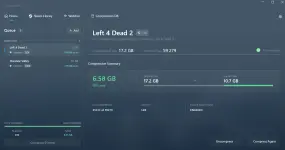
CompactGUI is a free, open-source tool for Windows 10 & 11 that compresses your installed games transparently—meaning you can still play them normally without extracting anything.
Benefits:
CompactGUI is a free, open-source tool for Windows 10 & 11 that compresses your installed games transparently—meaning you can still play them normally without extracting anything.
Benefits:
- Zero Game/App Degradation: Compression is transparent. You don't have to extract ZIP/RAR files to play or run your software—Windows handles the decompression on-the-fly in RAM with virtually no performance impact on modern CPUs.
- Massive Space Savings:
- ARK: Survival Evolved: 169 GB → 91.2 GB (~78 GB saved!)
- Adobe Photoshop: 1.71 GB → 886 MB (~50% reduction)
- Uses Windows Native API: It acts as a clean graphical front-end for compact.exe, exposing high-performance compression drivers (XPRESS4K, XPRESS8K, XPRESS16K, LZX) introduced in Windows 10.
- Smart Features:
- Community Compression Database: Built-in estimates based on 100k+ submissions so you know how much space you'll save before hitting compress.
- Background Watcher: Automatically monitors folders and keeps them compressed when games update.
- Windows Explorer Context Menu: Right-click any folder directly to compress/analyze it.

You do not have permission to view the full content of this post. Log in or register now.