 PH
PHMEGA INDEX CLOUDFLARE
You do not have permission to view the full content of this post. Log in or register now.
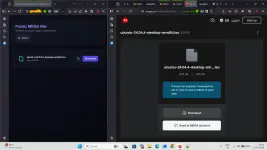
(Image Source github)
A Tester’s Review & Experience
 Introduction
I recently tested MEGA INDEX CLOUDFLARE, an open-source project that provides an alternative way to browse and access files stored on MEGA through a Cloudflare Worker.This post is based on my own testing experience and is intended as a technical discussion/review rather than an advertisement.
 What Is MEGA INDEX CLOUDFLARE?
The basic concept is:MEGA LINK
↓
CLOUDFLARE WORKER
↓
FILE INDEX
↓
BROWSER / DOWNLOAD
The Cloudflare Worker acts as an intermediate layer and generates a browsable interface for files available through a MEGA shared link.
Instead of navigating the normal MEGA interface, users can browse folders and access individual files through the generated index.
 Available Modes
The project provides two main modes.1.  Shared Link Mode
This is the simpler mode.The workflow is approximately:
MEGA SHARED LINK
↓
CLOUDFLARE WORKER
↓
GENERATED FILE INDEX
↓
SELECT FILE
↓
ACCESS / DOWNLOAD
For a public/shared MEGA link, a MEGA account login is not required just to process the shared link.
This makes the mode useful when the goal is simply to browse files from a shared folder.
2.  Account Mode
The project also provides an account-based mode for working with a user's own MEGA account.This provides additional functionality compared with processing only a public shared link.
However, because authentication information is involved, this mode requires more attention to security.
If using a deployment operated by someone else, users should understand how authentication information is handled.
For users who want more control, the open-source nature of the project allows them to inspect the code and deploy their own instance.
 My Testing Experience
The main feature I tested was converting a MEGA shared link into a browsable file index.The general workflow was:
Open MEGA Link
↓
Generate Index
↓
Browse Folders
↓
Select File
↓
Access / Download
The interface provides a more conventional file-listing approach, which can make it easier to locate individual files inside a large shared folder.
 Folder Browsing
A shared MEGA folder containing multiple directories can be represented as a browsable structure.For example:
ROOT
│
├── FOLDER 1
│ ├── FILE A
│ └── FILE B
│
├── FOLDER 2
│ ├── FILE C
│ └── FILE D
│
└── FOLDER 3
└── FILE E
This is useful when only a particular file is needed instead of downloading the entire folder.
 Individual File Access
Individual files can be selected from the generated index.For a folder containing many files, this allows the user to locate a specific file and access it without manually processing every other file.
HTTP-Based Access
Another interesting aspect is the HTTP-based interface.Depending on the particular file and software being used, the generated file access can be used with normal HTTP-compatible download tools.
This provides an alternative way of handling MEGA-hosted files.
 Large Files
Large files are another area where the concept becomes interesting.For example:
MEGA
↓
LARGE FILE
↓
CLOUDFLARE WORKER
↓
HTTP ACCESS
↓
DOWNLOAD SOFTWARE
The purpose is not to make a large file smaller or automatically increase the internet connection speed.
The main idea is to provide another method of accessing the MEGA-hosted file.
 Current Limitation
During testing, the more noticeable limitation was handling large and complicated folder structures.Individual files are relatively straightforward to access, but downloading an entire folder containing many nested directories is less convenient.
For example:
Open folder
↓
Open subfolder
↓
Find file
↓
Download
↓
Repeat
This becomes increasingly inconvenient when a folder contains hundreds or thousands of files.
Bulk folder downloading is therefore an area that could be improved.
Experimental ZIP Streaming
One particularly interesting development is the concept of streaming a MEGA folder directly as a ZIP archive.The basic idea is:
MEGA FILES
↓
FETCH DATA
↓
BUILD ZIP STREAM
↓
SEND ZIP DATA
↓
USER DEVICE
Instead of downloading all the files to a server first and then creating a ZIP archive, the ZIP data can theoretically be constructed progressively while the files are being retrieved.
This could make large folder downloads much more convenient.
ZIP Feature Status
The ZIP streaming functionality should be considered experimental / work in progress.It involves several technical challenges, including retrieving MEGA data, constructing the ZIP structure, and continuously streaming the resulting data through the Worker.
Because of this, I would not treat the experimental ZIP functionality as a guaranteed solution for important downloads.
The normal file-index functionality and the experimental ZIP functionality should be considered separately.
 Why Cloudflare?
The project uses Cloudflare Workers as the deployment layer.The general architecture is:
CLOUDFLARE ACCOUNT
↓
CLOUDFLARE WORKER
↓
MEGA PROCESSING
↓
FILE INDEX
One useful aspect for technically experienced users is the possibility of deploying their own Worker.
This provides more control over the deployment instead of relying entirely on a third-party instance.
 Open-Source Aspect
The project is open source, which allows users to:- Inspect the source code
- Deploy their own instance
- Modify the implementation
- Report bugs
- Experiment with features
- Review how authentication is handled
 Security Considerations
There is an important distinction between the two modes.Shared Link Mode
For a public/shared MEGA link, MEGA account credentials are not required.Account Mode
Account Mode involves authentication information.Users should therefore understand where their credentials or authentication information are being sent and processed.
If privacy is important, self-hosting and reviewing the source code provides greater transparency.
Things to Keep in Mind
The project depends on external services and infrastructure.Its behaviour can potentially be affected by:
- MEGA changes
- Cloudflare changes or limits
- API changes
- Network conditions
- Browser changes
- Changes to the project
 Basic Usage
The general workflow is:- Deploy the Worker through Cloudflare.
- Open the deployed Worker.
- Select the required mode.
- For Shared Link Mode, provide a public/shared MEGA link.
- Browse the generated index.
- Select the required folder or file.
- Access or download the file.
 Final Thoughts
After testing MEGA INDEX CLOUDFLARE, I found the concept technically interesting, particularly for browsing and accessing individual files from large MEGA shared folders.The basic architecture is straightforward:
MEGA
↓
CLOUDFLARE WORKER
↓
FILE INDEX
↓
HTTP-BASED ACCESS
The Shared Link Mode is the simpler approach because it does not require MEGA account credentials for public/shared links.
Account Mode provides additional functionality but requires more attention to authentication and security.
The experimental ZIP streaming concept is also interesting, especially for large folder structures, although it should currently be considered work in progress.
Overall, my experience was that the project provides an interesting open-source approach to browsing MEGA content through a Cloudflare Worker, while bulk folder handling and ZIP streaming remain areas for further development.
Tester’s Summary
Tested: MEGA INDEX CLOUDFLAREType: Open-source project
Deployment: Cloudflare Worker
Main function: Browse and access MEGA files
Shared links: Supported
Account mode: Available
Individual file access: Supported
Bulk folder handling: Limited / less convenient
ZIP streaming: Experimental
This post is based on my testing experience and is intended for technical discussion and feedback.