 PH
PHHi everyone!  Please support my little project, Ping Monitor—a simple Windows tool for your PC or laptop.
 Keep an eye on your ping, packet loss, and connection status while gaming, studying, or working—all in a small panel beside your taskbar.
 Features
 Completely free to use—no monthly fees or subscription required. Donations are optional.
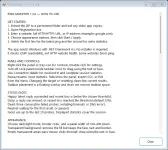
 How to use: Download and extract the ZIP, open PingMonitor.exe, enter a website like google.com, and click Start / Apply. A README.txt is included for more help.
 Download: You do not have permission to view the full content of this post.
Log in or register now. · You do not have permission to view the full content of this post.
Log in or register now.
Download: You do not have permission to view the full content of this post.
Log in or register now. · You do not have permission to view the full content of this post.
Log in or register now.
Give it a try and let me know what you think! Your feedback and shares help me improve it. Thank you for supporting my project!

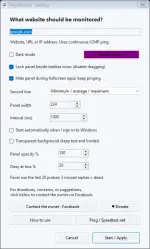
Please support my little project, Ping Monitor—a simple Windows tool for your PC or laptop. Keep an eye on your ping, packet loss, and connection status while gaming, studying, or working—all in a small panel beside your taskbar. Features- Live ping and packet-loss monitoring
- Connection status faces


- Dark/light mode and transparent background
- Optional startup with Windows
- Background monitoring during fullscreen apps
Completely free to use—no monthly fees or subscription required. Donations are optional. How to use: Download and extract the ZIP, open PingMonitor.exe, enter a website like google.com, and click Start / Apply. A README.txt is included for more help. Download: You do not have permission to view the full content of this post.
Log in or register now. · You do not have permission to view the full content of this post.
Log in or register now.Give it a try and let me know what you think! Your feedback and shares help me improve it. Thank you for supporting my project!