 PH
PHketchup009
Established

Create a typographic illustration shaped like a [OBJECT], where the text [BRAND SLOGAN] forms the shape — bold and playful lettering style that fills the entire silhouette — letters adapt fluidly to the curves and contours of the [OBJECT] — [COLOR DESCRIPTION] with [BACKGROUND COLOR] background that enhances the focus on the main shape — include [BRAND] logo positioned below the [OBJECT] — vector-style, clean, high resolution, 1080x1080 pixels, square format.
Here's my sample work:
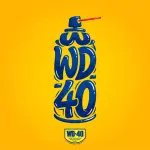
Create a typographic illustration shaped like a [WATER DISPLACEMENT SPRAY], where the text [WD-40] forms the shape — bold and playful lettering style that fills the entire silhouette — letters adapt fluidly to the curves and contours of the [WATER DISPLACEMENT SPRAY] — [BLUE] with [YELLOW] background that enhances the focus on the main shape — include [WD-40] logo positioned below the [WATER DISPLACEMENT SPRAY] — vector-style, clean, high resolution, 1080x1080 pixels, square format.
Keep on trying until you are satisfied with the result!
Pa-react na lang kung nakatulong. Salamat!