 PH
PH
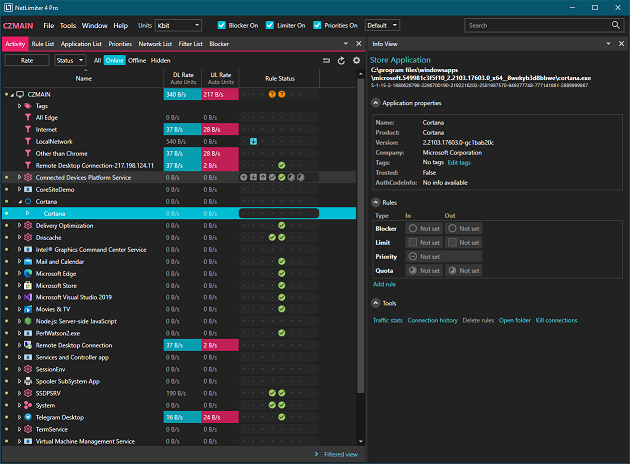
NetLimiter is an ultimate internet/network control, security and statistical tool for Windows. Use it to manage bandwidth of individual applications, monitor data coming to and out of your machine in real-time, block unwanted intruders, analyze network problems and much more…
Limit
Set maximum transfer speed of your machine, applications running on it, particular user or a single connection. Set maximum bandwidth for any entity or adjust their bandwidth priority.
Internet traffic monitoring
Monitor in real-time how much data is transferred from/to any application from/to internet or other networks. Real-time traffic chart is available.
Connection Blocker
Create rules to block seleted application from connecting to internet. Interactive Ask prompt window allows creating rules in real-time. Many conditions can be specified to fine-tune rules.
Traffic chart
Displays DL/UL data transfers speeds for selected application or connection.
Long-term stats
Long-term locally stored detailed traffic statistics. You can view and analyze network traffic in retrospect.
Info tool
Displays detailed information about selected connection, application or filter.
Connection History
Displays traffic stats grouped by Ip address, port and application.
Connection Log
Displays detaied list of connections allowed or blocked from (or to) a PC.
Filters
Create customs filters based on application paths, domain names, IP address ranges, users and much more. For filters, you can create Blocker rules, limits etc.
Rule editor
Allows detailed customization of NetLimiter rules.
Remote administration
Remotely control other machines with NetLimiter installed.
User permissions
Specify which user can control or monitor traffic on a machine with NetLimiter.
Rule scheduler
Specify times when a rule (limit, priority) will be automatically enabled or disabled.
Quotas
Lets you set data transfer quotas for selected application/filter. If the quota is reached - limit, blocker rule or other rules could be enabled.
Links:
Code:
https://www.netlimiter.com/Download:
Code:
https://rg.to/file/ca7614dcdde59cc9f4592da63ed3d3cf
https://nitroflare.com/view/A46E999814DC728
https://frdl.io/f3199rwj3sex
https://www.mediafire.com/file/1x89wk2bxz3ymdz
Password: 3522