 PH
PH NETFLIX COOKIE EXTENSION – QUICK GUIDE
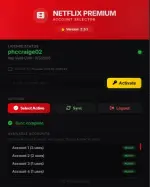
INSTALL
- Register your own phc username here →
You do not have permission to view the full content of this post. Log in or register now.
- use any browser: any browser://extensions/ → Enable Developer mode
- Click Load unpacked → Select extracted folder
ACTIVATE
- Click the red N icon in Chrome toolbar
- Copy license key from your account
- Paste license key → Click Activate
USE
- Click account you want to use → then select acttive
- Auto-loads Netflix → you're logged in

FEATURES
You do not have permission to view the full content of this post. Log in or register now.
Please use feedback , i really appreciate mga sir/madam. Thankyou so much support.
Q & A
Q: Bakit ni-revoke ang license key ko? Ayaw gumana?A: Is that your PHC username? If you're not using the same username from PHC, your license may be revoked and your account may be banned.
Q: Bakit kailangan ang PHC username?
A: This allows me to properly control who can access my thread and keep track of who has already provided feedback.
 palit ka ulit dun, itugma mo. Thankyouuu bossing.