 PH
PH WHAT IS THIS?
Netflix Account Generator PRO is a Chrome extension that lets you switch
between Netflix accounts instantly using cookies.
No passwords needed – just click and watch!
 Watch Netflix without logging in manually Switch between multiple accounts instantly Auto-removes expired cookies Works with any Netflix region TAKE NOTE
If account max 4 during watch, please wait for now i'm working in another cookies.
 SCREENSHOTS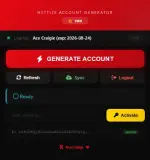
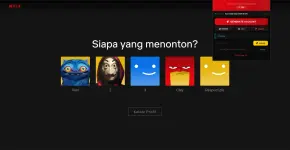
 FEATURES
 INSTANT ACCOUNT SWITCHING
→ Generate a working Netflix account with 1 click
AUTO-REMOVE DEAD COOKIES→ Expired cookies are automatically removed
LICENSE PROTECTION→ Only licensed users can access the system
PREMIUM UI→ Netflix-inspired dark theme with glass effects
LOGOUT + REFRESH→ Quick access to Netflix controls
 HOW TO INSTALL
 STEP 1: DOWNLOAD THE EXTENSION
Download link new version: Download
STEP 2: EXTRACT THE FILESExtract the zip file to a folder on your computer.
Password: 123321
STEP 3: LOAD INTO CHROME1. Open Chrome and go to: chrome://extensions/
2. Enable "Developer mode" (top right)
3. Click "Load unpacked"
4. Select the extension folder
5. The extension is now installed!
 STEP 4: GET YOUR LICENSE KEY
Spoiler contents are visible only to Established Members.
 HOW TO USE
 . CLICK THE EXTENSION ICON
→ Click the red "N" icon in your Chrome toolbar
 . ACTIVATE YOUR LICENSE
→ Paste your license key → Click "Activate"
→ You'll see:
Licensed . GENERATE AN ACCOUNT
→ Click "GENERATE ACCOUNT"
→ The extension will try available cookies
→ You'll see:
 Success 1/5!
 . WATCH NETFLIX
→ Netflix will load automatically
→ You're logged in and ready to watch!
 QUICK TIPS
 If a cookie doesn't work:
→ The extension auto-removes it and tries the next one
If you see "License expired":→ Feedback or DM me.
To refresh your cookie pool:→ Click the "Sync" button
To log out of Netflix:→ Click the "Logout" button
Developer Mode:→ Use a license with "DEV" in the name to see stats
 TROUBLESHOOTING
 "License invalid or expired"
→ Make sure you entered the key correctly
→ Contact craige for a new key
"No cookies available"→ Click "Sync" to refresh the cookie pool
→ Try again in a few minutes
"Netflix login page shows"→ The cookies might be expired
→ Click "Generate Account" again
Extension not showing in Chrome→ Go to chrome://extensions/
→ Make sure "Developer mode" is ON
→ Click "Load unpacked" again
If a cookie doesn't work:→ The extension auto-removes it and tries the next one
If you see "License expired":→ Feedback or DM me.
To refresh your cookie pool:→ Click the "Sync" button
To log out of Netflix:→ Click the "Logout" button
Developer Mode:→ Use a license with "DEV" in the name to see stats
 FEEDBACK & SUGGESTIONS
If you have any suggestions or feature requests,
leave a comment below or DM me