PH
PHHi PHC,
Dahil sa madalas ako nag apply ng work, at panay ang revise ko ng resume, naisip ko na mag develop ng app kagabi.
So eto n nga sya.
Comment nlng sa may need so ill send you my file via gdrive or onedrive
--
There are plenty of free CV, résumé and ATS scanners online.
They're convenient—but have you ever stopped to think about what you're uploading?
Your CV may contain your:
 Full name
 Email address
 Phone number
 Location
 Complete employment history
 Education and training
 Professional certifications
 LinkedIn and other professional profiles
So before uploading your CV to an unknown website, it's worth asking:
Where is my information being sent?
Is my CV stored after the scan?
Who has access to it?
Is my information being shared or used elsewhere?
Do I really need to upload all this personal information just to analyse my CV?
That got me thinking...
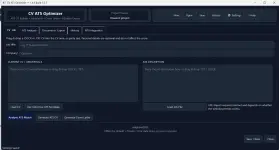
An independent project I've been developing to help job seekers analyse, improve and prepare their CVs directly on their own computer.
Instead of requiring you to upload your CV to an online scanner, the application's core CV and ATS tools run locally on your PC.
 Compare your CV against a job description
Calculate an overall ATS/job match score
Analyse skills and keyword matching
Check ATS-friendly CV structure
Identify matched strengths and potential gaps
Track your Before → Current → Improvement score
Help optimise your CV for a particular vacancy
Create and edit cover letters
Edit CV content before exporting
Export CVs to Word and PDF
Export ATS analysis reports
Maintain application/history information
Multiple themes, including custom colours
Portable — designed to run directly on your computer
Want AI assistance without automatically sending your CV to an online AI service?
CV ATS Optimizer supports optional local AI through Ollama.
With a compatible Ollama model installed, AI processing can run locally on your own computer.
 No AI API key required for Ollama
 No ρáíd AI subscription required for local AI
 The model runs on your computer
 After the model is installed, local AI doesn't require an online AI service
Online AI/API integration is also available as an optional feature for users who want to configure their own provider.
Don't want AI at all?
That's fine too.
Simply use Offline / No AI mode and continue using the normal ATS and CV tools.
One of the main ideas behind this project is simple:
Your CV. Your computer. Your information.
The core application does not require you to upload your CV to a random CV-scanning website.
You decide whether to use:
Offline processing → Local Ollama AI → Optional online API
The choice remains with the user.
CV ATS Optimizer is independently developed and is currently not digitally code-signed.
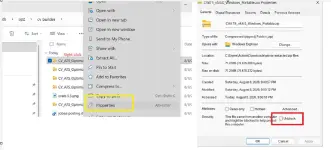
I'm an independent developer and currently don't use a commercial code-signing certificate. Because of this, Windows SmartScreen or antivirus software may show an “Unknown publisher”, “Windows protected your PC”, or similar warning, particularly with a newly downloaded executable.
A SmartScreen warning does not by itself establish that an application is malicious; unsigned applications and software without established download reputation can also trigger warnings.
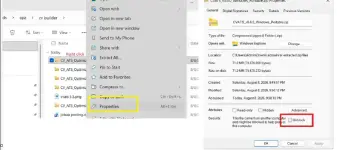
However, please don't blindly bypass security warnings for any software.
Only use a copy of CV ATS Optimizer obtained from my official/shared release source. If you receive a copy from somewhere you don't recognise or the file has been modified, don't run it.
CV ATS Optimizer is an assistance tool, not a guarantee of employment or an exact representation of every employer's ATS system.
ATS scores and recommendations should be treated as guidance.
Always review your CV before submitting it, particularly content suggested or rewritten using AI.
The software should only be used with documents and information that you own or have permission to process. Users remain responsible for how they use the application and for any information they choose to send to third-party online AI/API providers.
Because getting help with your CV shouldn't necessarily mean uploading your personal and professional history to another website.
Portable. Local. Offline-first. Privacy-focused. AI optional.
No online scanner required for the core functionality.
Would you use a CV/ATS optimiser that runs locally on your own computer?
I'd be interested to hear what features you'd want to see next.
You do not have permission to view the full content of this post. Log in or register now.
Dahil sa madalas ako nag apply ng work, at panay ang revise ko ng resume, naisip ko na mag develop ng app kagabi.
So eto n nga sya.
Comment nlng sa may need so ill send you my file via gdrive or onedrive
--
Would you upload your entire career history to a website you know nothing about?
There are plenty of free CV, résumé and ATS scanners online.
They're convenient—but have you ever stopped to think about what you're uploading?
Your CV may contain your:
Full name Email address Phone number Location Complete employment history Education and training Professional certifications LinkedIn and other professional profilesSo before uploading your CV to an unknown website, it's worth asking:
Where is my information being sent?
Is my CV stored after the scan?
Who has access to it?
Is my information being shared or used elsewhere?
Do I really need to upload all this personal information just to analyse my CV?
That got me thinking...
 Introducing CV ATS Optimizer
An independent project I've been developing to help job seekers analyse, improve and prepare their CVs directly on their own computer.
Instead of requiring you to upload your CV to an online scanner, the application's core CV and ATS tools run locally on your PC.
 What can it do?
Compare your CV against a job description Calculate an overall ATS/job match score Analyse skills and keyword matching Check ATS-friendly CV structure Identify matched strengths and potential gaps Track your Before → Current → Improvement score Help optimise your CV for a particular vacancy Create and edit cover letters Edit CV content before exporting Export CVs to Word and PDF Export ATS analysis reports Maintain application/history information Multiple themes, including custom colours Portable — designed to run directly on your computer Optional Local AI
Want AI assistance without automatically sending your CV to an online AI service?
CV ATS Optimizer supports optional local AI through Ollama.
With a compatible Ollama model installed, AI processing can run locally on your own computer.
No AI API key required for Ollama No ρáíd AI subscription required for local AI The model runs on your computer After the model is installed, local AI doesn't require an online AI serviceOnline AI/API integration is also available as an optional feature for users who want to configure their own provider.
Don't want AI at all?
That's fine too.
Simply use Offline / No AI mode and continue using the normal ATS and CV tools.
 Privacy first
One of the main ideas behind this project is simple:
Your CV. Your computer. Your information.
The core application does not require you to upload your CV to a random CV-scanning website.
You decide whether to use:
Offline processing → Local Ollama AI → Optional online API
The choice remains with the user.
 Important note about Windows SmartScreen
CV ATS Optimizer is independently developed and is currently not digitally code-signed.
I'm an independent developer and currently don't use a commercial code-signing certificate. Because of this, Windows SmartScreen or antivirus software may show an “Unknown publisher”, “Windows protected your PC”, or similar warning, particularly with a newly downloaded executable.
A SmartScreen warning does not by itself establish that an application is malicious; unsigned applications and software without established download reputation can also trigger warnings.
However, please don't blindly bypass security warnings for any software.
Only use a copy of CV ATS Optimizer obtained from my official/shared release source. If you receive a copy from somewhere you don't recognise or the file has been modified, don't run it.
 A few important points
CV ATS Optimizer is an assistance tool, not a guarantee of employment or an exact representation of every employer's ATS system.
ATS scores and recommendations should be treated as guidance.
Always review your CV before submitting it, particularly content suggested or rewritten using AI.
The software should only be used with documents and information that you own or have permission to process. Users remain responsible for how they use the application and for any information they choose to send to third-party online AI/API providers.
 Why did I build it?
Because getting help with your CV shouldn't necessarily mean uploading your personal and professional history to another website.
Portable. Local. Offline-first. Privacy-focused. AI optional.
No online scanner required for the core functionality.
Would you use a CV/ATS optimiser that runs locally on your own computer?
I'd be interested to hear what features you'd want to see next.
You do not have permission to view the full content of this post. Log in or register now.