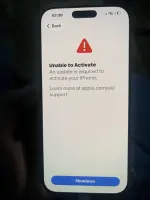
❓ Help Unable to activate Iphone 16 pro

Step 1 – Force Restart

  • Press and quickly release Volume Up, then Volume Down, then press and hold the Side button until the Apple logo appears.
  • If that fails, proceed.
Step 2 – Check Network Connection

  • Ensure you’re on a stable Wi-Fi or cellular data.
  • If no Wi-Fi, insert any active SIM card to trigger carrier activation.
Step 3 – Update via Recovery Mode (PC/Mac)

  • Connect iPhone to a computer with iTunes (Windows) or Finder (Mac).
  • Force restart again, but keep holding the Side button until you see “Connect to iTunes” / recovery mode screen.
Step 4 – Restore or Update

  • On the computer, click “Update” (not “Restore”) – this keeps data and installs the latest iOS version.
  • If Update fails, click “Restore” – this wipes the phone but bypasses the activation lock if it’s a firmware mismatch.
Step 5 – Use a Different SIM/Region

  • Remove the current SIM, insert a SIM from a different carrier (preferably one that supports the iPhone model).
  • Connect to Wi-Fi and try activation again – sometimes carrier bundles trigger the correct update.
Step 6 – Manual Date/Time Bypass (if stuck on activation screen)

  • Tap “Emergency” > “Medical ID” (if available) – some versions let you access Settings from there.
  • Change date to 1 month ago, then try activation – this can skip certain certificate checks.
Step 7 – Use Apple Configurator 2 (Mac only)

  • Download Apple Configurator from the Mac App Store.
  • Put iPhone in DFU mode (Volume Up, Volume Down, then Side button for 10s, then hold Side + Volume Down for 5s, release Side but keep Volume Down for 10s).
  • Click “Restore” in Configurator – it forces a fresh iOS install with latest build.
Step 8 – Hardware Check (last resort)

  • Open the SIM tray – check if the IMEI is blacklisted (use online IMEI checker).
  • If blacklisted, the phone is paperweight – no software fix. Swap the logic board from a donor iPhone of the same model.
 
Step 1 – Force Restart

  • Press and quickly release Volume Up, then Volume Down, then press and hold the Side button until the Apple logo appears.
  • If that fails, proceed.
Step 2 – Check Network Connection

  • Ensure you’re on a stable Wi-Fi or cellular data.
  • If no Wi-Fi, insert any active SIM card to trigger carrier activation.
Step 3 – Update via Recovery Mode (PC/Mac)

  • Connect iPhone to a computer with iTunes (Windows) or Finder (Mac).
  • Force restart again, but keep holding the Side button until you see “Connect to iTunes” / recovery mode screen.
Step 4 – Restore or Update

  • On the computer, click “Update” (not “Restore”) – this keeps data and installs the latest iOS version.
  • If Update fails, click “Restore” – this wipes the phone but bypasses the activation lock if it’s a firmware mismatch.
Step 5 – Use a Different SIM/Region

  • Remove the current SIM, insert a SIM from a different carrier (preferably one that supports the iPhone model).
  • Connect to Wi-Fi and try activation again – sometimes carrier bundles trigger the correct update.
Step 6 – Manual Date/Time Bypass (if stuck on activation screen)

  • Tap “Emergency” > “Medical ID” (if available) – some versions let you access Settings from there.
  • Change date to 1 month ago, then try activation – this can skip certain certificate checks.
Step 7 – Use Apple Configurator 2 (Mac only)

  • Download Apple Configurator from the Mac App Store.
  • Put iPhone in DFU mode (Volume Up, Volume Down, then Side button for 10s, then hold Side + Volume Down for 5s, release Side but keep Volume Down for 10s).
  • Click “Restore” in Configurator – it forces a fresh iOS install with latest build.
Step 8 – Hardware Check (last resort)

  • Open the SIM tray – check if the IMEI is blacklisted (use online IMEI checker).
  • If blacklisted, the phone is paperweight – no software fix. Swap the logic board from a donor iPhone of the same model.
hindi nga mabuksan
 

About this Thread

  • 6
    Replies
  • 35
    Views
  • 2
    Participants
Last reply from:
Veraix

Trending Topics

Online now

Members online
628
Guests online
3,200
Total visitors
3,828

Forum statistics

Threads
2,296,535
Posts
29,106,577
Members
1,205,405
Latest member
- 4rchyd
Back
Top