 PH
PHKwarta — Personal Finance App (FREE & Open Source)
Hey everyone! I built a personal finance management dashboard called Kwarta ("money" in Filipino) and I'm releasing it as open source.
Palike naman po mga boss para sipagin gumawa at magshare ng iba pang useful apps salamat
---
WHAT IT DOES
Kwarta is a full-stack personal finance app that runs in your browser. Track all your money in one place — accounts, transactions, bills, and savings goals — with beautiful charts and reports.
---
FEATURES
Financial Tracking:
• Accounts — Track cash, bank, savings, credit cards, e-wallets, investments, and crypto. Balances auto-update when you add transactions.
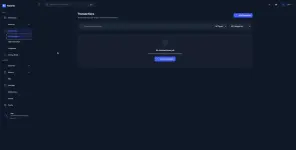
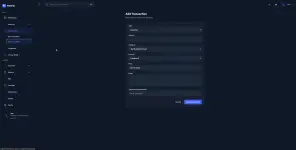
• Transactions — Record income and expenses with categories, tags, notes, and receipt images. Cents supported everywhere with formatted currency inputs.
• Bills — Manage recurring bills with due dates, auto-pay, reminders, and ρáíd/unpaid status. Overdue bills show red warnings.
• Savings Goals — Set target amounts with deadlines. Track contributions and watch progress bars fill up.
Insights & Reports:
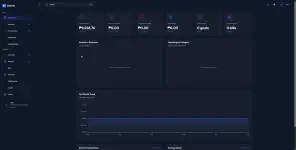
• Dashboard — Summary cards showing total balance, monthly income/expenses, net savings, active goals, and upcoming bills. Charts use real data computed from your transactions.
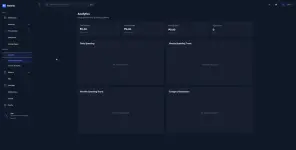
• Analytics — Daily, weekly, and monthly spending trends with category breakdown. Income source analytics.
• Reports — Monthly and yearly financial summaries with JSON export.
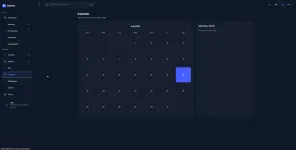
• Calendar — Month view showing all your transactions and bills by date.
User Experience:
• Mobile-first — This was built primarily for phone use. Bottom navigation bar, floating quick-add button on the dashboard, card-based layouts instead of horizontal tables, and bottom-sheet modals that slide up from the bottom.
• Works as a PWA — Open in Chrome/Safari on your phone, tap "Install app" or "Add to Home Screen", and it launches full-screen like a native app. No App Store needed.
• Dark mode — Light and dark themes with persistent preference.
• Real-time sync — Account balances update automatically when you add, edit, or delete transactions.
• Currency formatting — Amounts display with commas and 2 decimal places. Works with cents (e.g., ₱10,000.75).
• Notifications — In-app notification system with type badges (info, success, warning, error).
---
TECH STACK
• Framework: Next.js 16 (App Router)
• Language: TypeScript
• Styling: Tailwind CSS v4
• Backend: Supabase (PostgreSQL, Auth, Row-Level Security)
• Charts: ApexCharts
• Calendar: FullCalendar
• State: React Context API
• Custom CurrencyInput component with focus/blur formatting
---
DATABASE
9 tables, all with Row-Level Security so each user only sees their own data:
profiles → accounts → transactions → categories → budgets → savings_goals → contributions → bills → notifications
All monetary columns use DECIMAL(12,2) for precise cents handling. Auto-profile creation on signup via Supabase trigger.
---
17 PAGES
/ Dashboard
/accounts Manage accounts
/transactions View, add, edit, delete transactions
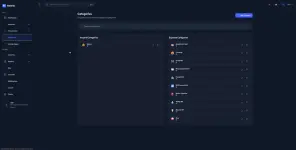
/categories Organize categories
/savings-goals Track savings goals
/bills Manage bills
/analytics Spending trends
/analytics/income Income breakdown
/reports/monthly Monthly report
/reports/yearly Yearly report
/calendar Calendar view
/notifications Notification center
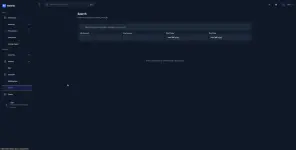
/search Search transactions
/profile User profile
/settings Preferences and data export
/signin Sign in
/signup Create account
---
HOW TO SELF-HOST
Prerequisites: Node.js 1☍+, Supabase account (free tier)
1. Clone: git clone You do not have permission to view the full content of this post. Log in or register now.
2. Install: npm install
3. Create a Supabase project at supabase.com
4. Run supabase-schema.sql in Supabase SQL Editor (creates all tables + RLS + triggers)
5. Create .env.local with:
NEXT_PUBLIC_SUPABASE_URL=your-project-url
NEXT_PUBLIC_SUPABASE_PUBLISHABLE_KEY=your-anon-key
6. Run: npm run dev
Deploy to Vercel:
1. Import the GitHub repo in Vercel
2. Add the two environment variables above
3. Deploy — Vercel auto-detects Next.js
---
MOBILE APP (NO APP STORE) == WORKS SO WELL , IM CURRENTLY USING THIS. NO HASSLE
Once hosted on Vercel, open the app in Chrome or Safari on your phone:
• Chrome: Tap three-dot menu → "Install app"
• Safari: Tap Share button → "Add to Home Screen"
It launches full-screen without browser chrome, just like a native app.
---
WHY I BUILT THIS
I wanted something I could actually use daily on my phone to track my money. Most finance apps are either too complex, have monthly subscriptions, or aren't optimized for mobile. Kwarta is free, open source, and works great on a phone screen.
---
FEEDBACK WELCOME
This is a living project. If you find bugs, have feature requests, or want to contribute — open an issue or PR on GitHub. Star the repo if you find it useful!
---
License: MIT









Hey everyone! I built a personal finance management dashboard called Kwarta ("money" in Filipino) and I'm releasing it as open source.
Palike naman po mga boss para sipagin gumawa at magshare ng iba pang useful apps salamat
---
WHAT IT DOES
Kwarta is a full-stack personal finance app that runs in your browser. Track all your money in one place — accounts, transactions, bills, and savings goals — with beautiful charts and reports.
---
FEATURES
Financial Tracking:
• Accounts — Track cash, bank, savings, credit cards, e-wallets, investments, and crypto. Balances auto-update when you add transactions.
• Transactions — Record income and expenses with categories, tags, notes, and receipt images. Cents supported everywhere with formatted currency inputs.
• Bills — Manage recurring bills with due dates, auto-pay, reminders, and ρáíd/unpaid status. Overdue bills show red warnings.
• Savings Goals — Set target amounts with deadlines. Track contributions and watch progress bars fill up.
Insights & Reports:
• Dashboard — Summary cards showing total balance, monthly income/expenses, net savings, active goals, and upcoming bills. Charts use real data computed from your transactions.
• Analytics — Daily, weekly, and monthly spending trends with category breakdown. Income source analytics.
• Reports — Monthly and yearly financial summaries with JSON export.
• Calendar — Month view showing all your transactions and bills by date.
User Experience:
• Mobile-first — This was built primarily for phone use. Bottom navigation bar, floating quick-add button on the dashboard, card-based layouts instead of horizontal tables, and bottom-sheet modals that slide up from the bottom.
• Works as a PWA — Open in Chrome/Safari on your phone, tap "Install app" or "Add to Home Screen", and it launches full-screen like a native app. No App Store needed.
• Dark mode — Light and dark themes with persistent preference.
• Real-time sync — Account balances update automatically when you add, edit, or delete transactions.
• Currency formatting — Amounts display with commas and 2 decimal places. Works with cents (e.g., ₱10,000.75).
• Notifications — In-app notification system with type badges (info, success, warning, error).
---
TECH STACK
• Framework: Next.js 16 (App Router)
• Language: TypeScript
• Styling: Tailwind CSS v4
• Backend: Supabase (PostgreSQL, Auth, Row-Level Security)
• Charts: ApexCharts
• Calendar: FullCalendar
• State: React Context API
• Custom CurrencyInput component with focus/blur formatting
---
DATABASE
9 tables, all with Row-Level Security so each user only sees their own data:
profiles → accounts → transactions → categories → budgets → savings_goals → contributions → bills → notifications
All monetary columns use DECIMAL(12,2) for precise cents handling. Auto-profile creation on signup via Supabase trigger.
---
17 PAGES
/ Dashboard
/accounts Manage accounts
/transactions View, add, edit, delete transactions
/categories Organize categories
/savings-goals Track savings goals
/bills Manage bills
/analytics Spending trends
/analytics/income Income breakdown
/reports/monthly Monthly report
/reports/yearly Yearly report
/calendar Calendar view
/notifications Notification center
/search Search transactions
/profile User profile
/settings Preferences and data export
/signin Sign in
/signup Create account
---
HOW TO SELF-HOST
Prerequisites: Node.js 1☍+, Supabase account (free tier)
1. Clone: git clone You do not have permission to view the full content of this post. Log in or register now.
2. Install: npm install
3. Create a Supabase project at supabase.com
4. Run supabase-schema.sql in Supabase SQL Editor (creates all tables + RLS + triggers)
5. Create .env.local with:
NEXT_PUBLIC_SUPABASE_URL=your-project-url
NEXT_PUBLIC_SUPABASE_PUBLISHABLE_KEY=your-anon-key
6. Run: npm run dev
Deploy to Vercel:
1. Import the GitHub repo in Vercel
2. Add the two environment variables above
3. Deploy — Vercel auto-detects Next.js
---
MOBILE APP (NO APP STORE) == WORKS SO WELL , IM CURRENTLY USING THIS. NO HASSLE
Once hosted on Vercel, open the app in Chrome or Safari on your phone:
• Chrome: Tap three-dot menu → "Install app"
• Safari: Tap Share button → "Add to Home Screen"
It launches full-screen without browser chrome, just like a native app.
---
WHY I BUILT THIS
I wanted something I could actually use daily on my phone to track my money. Most finance apps are either too complex, have monthly subscriptions, or aren't optimized for mobile. Kwarta is free, open source, and works great on a phone screen.
---
FEEDBACK WELCOME
This is a living project. If you find bugs, have feature requests, or want to contribute — open an issue or PR on GitHub. Star the repo if you find it useful!
---
License: MIT