 PH
PHCarlos2026
Contributor
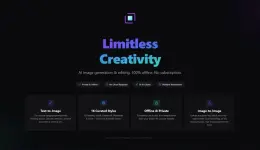
DreamForge AI 1.0.7
Created byYou do not have permission to view the full content of this post. Log in or register now.
Version1.0.7
License typefull_version
Release DateJuly 8, 2026
LanguagesMultilingual
Overview of DreamForge AI
It is built for anyone who wants to create amazing AI-generated images without depending on cloud services or monthly subscriptions. Everything runs directly on your computer, giving you complete control over your creative projects. Whether you are a digital artist, photographer, designer, or content creator, the software makes advanced image generation simple and accessible.
The software combines modern AI technology with an easy-to-use interface. You only need to describe your idea using natural language, and it produces detailed images in just a few moments. Since every task is processed locally, your work remains completely private while delivering fast and reliable performance.
The software combines modern AI technology with an easy-to-use interface. You only need to describe your idea using natural language, and it produces detailed images in just a few moments. Since every task is processed locally, your work remains completely private while delivering fast and reliable performance.
Create Stunning Images from Text
The tool turns your imagination into reality using simple text prompts. Just type a description, and the AI will generate detailed visuals ranging from realistic portraits to fantasy scenes and futuristic cityscapes.
Whether you are brainstorming new concepts or creating final artwork, it supports image resolutions up to 2048×2048. Three quality presets let you choose between quick previews and high-quality final renders, depending on your needs.
Whether you are brainstorming new concepts or creating final artwork, it supports image resolutions up to 2048×2048. Three quality presets let you choose between quick previews and high-quality final renders, depending on your needs.
Transform Photos into Beautiful Artwork
One of the software's biggest strengths is its collection of carefully optimized artistic styles. Instead of manually editing every image, you can completely change the appearance of a photo with a single click.
The available presets include Oil Painting, Sketch, Cartoon, Studio Ghibli, Watercolor, Cyberpunk, 3D Animation, Claymation, Chinese Ink, Ukiyo-e, Pixel Art, Pop Art, Vector Illustration, Cinematic, Vintage Film, Neon Glow, and Papercraft. Every preset is fine-tuned to produce natural-looking artistic results.
The available presets include Oil Painting, Sketch, Cartoon, Studio Ghibli, Watercolor, Cyberpunk, 3D Animation, Claymation, Chinese Ink, Ukiyo-e, Pixel Art, Pop Art, Vector Illustration, Cinematic, Vintage Film, Neon Glow, and Papercraft. Every preset is fine-tuned to produce natural-looking artistic results.
Fine-Grained Editing Control
The software offers more than just automatic image generation. Its Image Guidance slider lets you decide how much of the original picture should remain visible after editing. You can completely transform an image or make only small adjustments while preserving important details.
Negative prompts add another level of control by allowing you to remove unwanted objects, colors, or visual elements. This helps produce cleaner and more accurate results without repeating the editing process multiple times.
Negative prompts add another level of control by allowing you to remove unwanted objects, colors, or visual elements. This helps produce cleaner and more accurate results without repeating the editing process multiple times.
Privacy Comes First
Unlike many online AI tools, everything happens directly on your computer. Your images, prompts, and edits never leave your device, making it an excellent choice for users who value privacy.
Since there is no cloud processing, no account registration, and no internet requirement, you can continue creating artwork anywhere without worrying about data collection or online access.
Since there is no cloud processing, no account registration, and no internet requirement, you can continue creating artwork anywhere without worrying about data collection or online access.
Modern and Professional Workspace
The application features a clean, dark interface designed to keep your attention on your creative work. The frameless window gives it a modern appearance while keeping all the important tools within easy reach.
Real-time CPU and memory monitoring helps you understand how much system power is being used during image generation. This makes it easier to balance performance while working on larger projects.
Real-time CPU and memory monitoring helps you understand how much system power is being used during image generation. This makes it easier to balance performance while working on larger projects.
Flexible Quality Settings
Not every project requires maximum rendering quality. The software includes Low, Medium, and High quality modes so you can decide between speed and image detail.
Lower settings are perfect for quickly testing ideas, while higher settings produce polished artwork suitable for presentations, social media, or professional creative work.
Lower settings are perfect for quickly testing ideas, while higher settings produce polished artwork suitable for presentations, social media, or professional creative work.
Wide Export Compatibility
Once your artwork is complete, sharing it is simple. The tool supports several popular image formats, allowing your creations to work with almost any editing or publishing software.
Supported export formats include PNG, JPEG, BMP, WebP, and PDF. This flexibility makes it easy to prepare images for printing, websites, presentations, or digital portfolios.
Supported export formats include PNG, JPEG, BMP, WebP, and PDF. This flexibility makes it easy to prepare images for printing, websites, presentations, or digital portfolios.
Designed for Every Creative User
The software is suitable for beginners and professionals alike. Artists can generate concept art, photographers can apply artistic effects, designers can visualize ideas, and content creators can quickly produce eye-catching graphics for blogs and social media.
Its simple workflow removes technical barriers, allowing users to focus entirely on creativity instead of complicated AI settings.
Its simple workflow removes technical barriers, allowing users to focus entirely on creativity instead of complicated AI settings.
Key Features
- Generate AI images from natural language prompts.
- Apply 16 professionally optimized artistic styles.
- Create images up to 2048×2048 resolution.
- Three quality presets for speed or maximum detail.
- Image Guidance slider for precise editing control.
- Negative prompt support for cleaner results.
- Completely offline image generation and editing.
- No subscriptions, cloud processing, or user accounts.
- Real-time CPU and memory usage monitoring.
- Export images as PNG, JPEG, BMP, WebP, and PDF.
- Professional dark interface with multilingual support.
System Requirements
- Operating System: Windows 11 / 10
- Processor: 8 cores, 2.5 GHz+ (Minimum), 12 cores, 4.0 GHz+ (Recommended)
- RAM: 8GB (16GB or more recommended)
- Free Hard Disk Space: 10GB or more is recommended
- Graphics Processor: NVIDIA GeForce RTX 2060 or better (Minimum), NVIDIA GeForce RTX 3060 12 GB+ (Recommended)
- DirectX: DirectX 12 API, Hardware Feature Level 12
- Acceleration: NVIDIA graphics cards only.
- Recommendation: NVIDIA graphics card with 12GB+, NVIDIA driver version 572.x or higher.
- You do not have permission to view the full content of this post. Log in or register now.
-
- The password for Zip file is:123
NOTE!!!
Enjoy while the links are active!!
I am not responsible for broken links!!
Happy downloading!!!!
Enjoy while the links are active!!
I am not responsible for broken links!!
Happy downloading!!!!