 PH
PHHello Guys!
Madami na nag post neto dito sa phc, pero popost ko parin incase di nyo pa nabasa yung theads nun mga unang nagshare. You will get $10 credits when you sign up using my link and every successfull referral nyo din with complete verifcation is +$10 sayo, which you can use as tokens for open AI codex or claude.
Sign Up Process and Verification (required po mag verify para magamit nyo yung free 10usd credits)
1. You do not have permission to view the full content of this post. Log in or register now.
p.s. referral link ko po yan, again pag nag register kayo sa mga referral links, magkakaroon kayo 10USD at the same time yung nag share nung referral link nila (this time ako hihi)
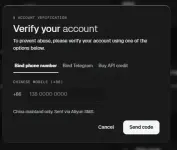
2. Upon sign up need nyo mag verify, Go to Home, look for "Unlock Steps" and cilck verify. Pumili nalang po kayo nung verification options na mas madali para sainyo. Example sakin mas madali is yung ibind yung telegram ko.
Installation and use - You do not have permission to view the full content of this post. Log in or register now.
Install nyo muna guys yung mga required na application para smooth yung pag lalagay nyo nung token nyo as claude or codex CLI. (pwede rin inside VS Code)
1. Install Git Bash (recommended) - You do not have permission to view the full content of this post. Log in or register now. or;
Install WinGet -> You do not have permission to view the full content of this post. Log in or register now.
-Installer.exe na to guys so no need na advance setup.
2. Install Nodejs - You do not have permission to view the full content of this post. Log in or register now.
3. Install Claude Code Client
4. Creating you own API Key. Go to API Keys > Generate new key. Kayo na bahala kahit anong name, basta pag ka generate nung API Key, copy nyo agad at save sa notepad.
5. Punta kayo dito (pag di nyo makita, ilagay nyo to sa address bar nung file explorer.
For Codex: C:\Users\<your-username>\.codex
For Claude: C:\Users\<your-username>\.claude

6. Create these files: (pag may files na kayong nakita na same neto, wag nyo dedelete. icopy nyo at itabi sa safe na folder para pag gusto nyo gumamit ng ibang login method sa codex maibabalik nyo agad.
Codex: (dalawang file)
filename: auth.json
filename: config.toml
Claude:
7. Launch codex or claude. Type nyo nalang "codex" or "claude"
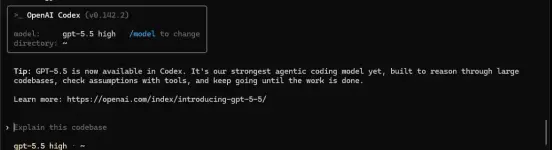
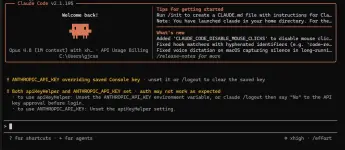
Note: Pag nagawa nyo naya, pag gagamit kayo ng VS Code naka link na sya. Mag iinstall nalang kayo nung extension ng codex or claude.
Madami na nag post neto dito sa phc, pero popost ko parin incase di nyo pa nabasa yung theads nun mga unang nagshare. You will get $10 credits when you sign up using my link and every successfull referral nyo din with complete verifcation is +$10 sayo, which you can use as tokens for open AI codex or claude.
Sign Up Process and Verification (required po mag verify para magamit nyo yung free 10usd credits)
1. You do not have permission to view the full content of this post. Log in or register now.
p.s. referral link ko po yan, again pag nag register kayo sa mga referral links, magkakaroon kayo 10USD at the same time yung nag share nung referral link nila (this time ako hihi)
2. Upon sign up need nyo mag verify, Go to Home, look for "Unlock Steps" and cilck verify. Pumili nalang po kayo nung verification options na mas madali para sainyo. Example sakin mas madali is yung ibind yung telegram ko.
Installation and use - You do not have permission to view the full content of this post. Log in or register now.
Install nyo muna guys yung mga required na application para smooth yung pag lalagay nyo nung token nyo as claude or codex CLI. (pwede rin inside VS Code)
1. Install Git Bash (recommended) - You do not have permission to view the full content of this post. Log in or register now. or;
Install WinGet -> You do not have permission to view the full content of this post. Log in or register now.
-Installer.exe na to guys so no need na advance setup.
2. Install Nodejs - You do not have permission to view the full content of this post. Log in or register now.
3. Install Claude Code Client
Rich (BB code):
Installing CLIs

for Claude Code:
npm install -g @anthropic-ai/claude-code
or
winget install -e --id Anthropic.ClaudeCode

for OpenAI Codex:
npm install -g @openai/codex
or
winget install -e --id OpenAI.Codex
4. Creating you own API Key. Go to API Keys > Generate new key. Kayo na bahala kahit anong name, basta pag ka generate nung API Key, copy nyo agad at save sa notepad.
5. Punta kayo dito (pag di nyo makita, ilagay nyo to sa address bar nung file explorer.
For Codex: C:\Users\<your-username>\.codex
For Claude: C:\Users\<your-username>\.claude
6. Create these files: (pag may files na kayong nakita na same neto, wag nyo dedelete. icopy nyo at itabi sa safe na folder para pag gusto nyo gumamit ng ibang login method sa codex maibabalik nyo agad.
Codex: (dalawang file)
filename: auth.json
JSON:
{
   "OPENAI_API_KEY" : "YOUR_API_KEY"
}
filename: config.toml
JSON:
model_provider = "freemodel"
model = "gpt-5.5"
model_reasoning_effort = "xhigh"
disable_response_storage = true
preferred_auth_method = "apikey"

[model_providers.freemodel]
name = "freemodel"
base_url = "https://api.freemodel.dev"
wire_api = "responses"
Claude:
JSON:
{
     "env" : {
         "ANTHROPIC_API_KEY" : "YOUR_API_KEY" ,
         "ANTHROPIC_BASE_URL" : "https://cc.freemodel.dev" ,
         "CLAUDE_CODE_DISABLE_NONESSENTIAL_TRAFFIC" : "1"
    },
     "permissions" : {
         "allow" : [],
         "deny" : [] },
     "apiKeyHelper" : "echo 'YOUR_API_KEY'"
}
7. Launch codex or claude. Type nyo nalang "codex" or "claude"
Note: Pag nagawa nyo naya, pag gagamit kayo ng VS Code naka link na sya. Mag iinstall nalang kayo nung extension ng codex or claude.