PH
PH:
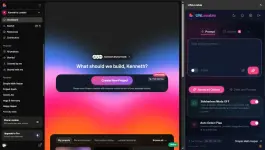
Chrome/Edge Extenstion to use Lovable na walang credit usage 
Ready ka na? Just follow these quick steps para makapagsimula agad - alam naman siguro ng karamihan paano mag install ng chrome/edge extenstion pero explain ko na din, hehe
 May guide din sa extension kung paano kumuha ng login code at mag-redeem ng promo codes.
I-type lang ang /login dito sa bot para makuha ang 6-digit access code mo.
You’re all set!
Open Lovable and start using UNLovable habang active ang subscription mo.
FREE 24-Hour Access Codes
Limited to 20 users only.
(FREE 30 DAYS FOR PHC USERS - USE CODE
 Please send feedback kung working sa’yo
Welcome to UNLovable! 
Chrome/Edge Extenstion to use Lovable na walang credit usage Ready ka na? Just follow these quick steps para makapagsimula agad - alam naman siguro ng karamihan paano mag install ng chrome/edge extenstion pero explain ko na din, hehe
 Step 1: Install the Extension
- I-download ang UNLovable extension.
You do not have permission to view the full content of this post. Log in or register now.
- Buksan ang Chrome at pumunta sa chrome://extensions/.
- I-on ang Developer Mode sa upper-right corner.
- I-click ang Load unpacked at piliin ang UNLovable folder.
 Step 2: Get Your Access Code
May guide din sa extension kung paano kumuha ng login code at mag-redeem ng promo codes.I-type lang ang /login dito sa bot para makuha ang 6-digit access code mo.
 Step 3: Log In
- I-click ang UNLovable icon sa browser toolbar.
- Ilagay ang 6-digit access code.
- I-click ang Login.
Step 4: Enjoy!
You’re all set!
Open Lovable and start using UNLovable habang active ang subscription mo.
 Promo CODE!
FREE 24-Hour Access Codes
Limited to 20 users only.
Code:
FREE24HOURS(FREE 30 DAYS FOR PHC USERS - USE CODE
Code:
ILOVEPHC