 PH
PHMsPinkBlack
Eternal Poster
This Free internet is by via USB Tethering! Yung mga walang hpi at ehi lang ang meron o vpn sa cp at gusto magka internet sa pc! gamiton nyo to! via tethering
Tools Needed on this trick!
1. You do not have permission to view the full content of this post. Log in or register now. <--- PdaNet (PC)
2. You do not have permission to view the full content of this post. Log in or register now. <--- FoxFi KEY
Download the apps below on PLAYSTORE
3. FoxFi app
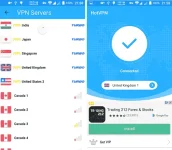
4. HotVPN o VPN Unblock Proxy (anything basta kokonek kay globe)
Procedure:
1. Install PdaNET for pc
2. Install FoxFi first before installing FoxFi Key to unlock the app
3. Install the VPN that you want to use on this trick
4. Connect your VPN now
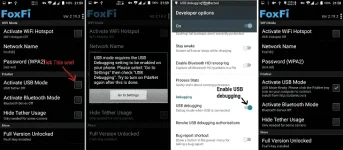
5. Open FoxFi then tick activate usb mode (you will be enabling usb debugging here)
6.Open PdaNet then right click and hit connect


Tyaga lang muna kayo dito! pwede rin kayo gumamit ng mga ehi o ponpon dito! same procedure lang din cla!
Tools Needed on this trick!
1. You do not have permission to view the full content of this post. Log in or register now. <--- PdaNet (PC)
2. You do not have permission to view the full content of this post. Log in or register now. <--- FoxFi KEY
Download the apps below on PLAYSTORE
3. FoxFi app
4. HotVPN o VPN Unblock Proxy (anything basta kokonek kay globe)
Procedure:
1. Install PdaNET for pc
2. Install FoxFi first before installing FoxFi Key to unlock the app
3. Install the VPN that you want to use on this trick
4. Connect your VPN now
5. Open FoxFi then tick activate usb mode (you will be enabling usb debugging here)
6.Open PdaNet then right click and hit connect
Tyaga lang muna kayo dito! pwede rin kayo gumamit ng mga ehi o ponpon dito! same procedure lang din cla!
