PH
PHdarscute03
Elite
Dropping this now for everyone! Don't sell this! It's free, yes, sir!
1. Direct link - You do not have permission to view the full content of this post. Log in or register now.
2. Click the Install button on the plugin
3. You can either add the game from here or go to your Steam, open the game, and you should see there Add via Luatools.
4. Go back to your library, then install
Ccto to the devs and Melly!
Update
Tested on my end

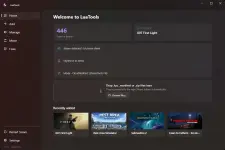
Easy Steps
1 - Make sure Steam is installed on your PC first
2 - Click " Add " on the left side
3 - Type the game you want
4 - Click fetch
5 - Click download
6 - Click Restart Steam once completed
Fix
- In case Denuvo games - click fixes
- No internet connection error - click mode, pick cloudredirect
Happy gaming, everyone!
Update / 10/6/26
If gusto nyo ng triple A games like Acr combat I can guide you guys sa dedivision para ma unlock sa steam nyo.

1. Direct link - You do not have permission to view the full content of this post. Log in or register now.
2. Click the Install button on the plugin
3. You can either add the game from here or go to your Steam, open the game, and you should see there Add via Luatools.
4. Go back to your library, then install
Ccto to the devs and Melly!
Update
Tested on my end
Easy Steps
1 - Make sure Steam is installed on your PC first
2 - Click " Add " on the left side
3 - Type the game you want
4 - Click fetch
5 - Click download
6 - Click Restart Steam once completed
Fix
- In case Denuvo games - click fixes
- No internet connection error - click mode, pick cloudredirect
Happy gaming, everyone!
Update / 10/6/26
If gusto nyo ng triple A games like Acr combat I can guide you guys sa dedivision para ma unlock sa steam nyo.