 PH
PHmackiezydzph
Enthusiast
PLEASE BARE IN MIND
WHAT U READ AND WHAT U LEARNED STAYS HERE!
Initial configurations
Start the "Settings" application on Android.
In the "Wireless & Networks" category, open "More..." and tap "VPN".
Click the "Add VPN profile" button to create a new VPN connection setting.

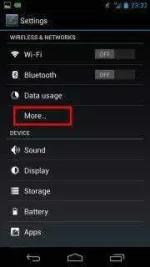
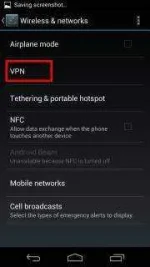
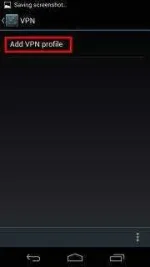
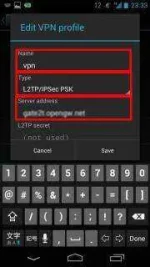
A new VPN connection setting editing screen will appear. Input something string on the "Name" field (e.g. "vpn" ), and choose "L2TP/IPSec PSK" in the "Type" field.
On this screen, you have to specify either hostname or IP address of the destination VPN Gate Public VPN Relay Server.
(an identifier ends with ".opengw.net" ) or IP Address (digits as xxx.xxx.xxx.xxx) and paste it on the "Server address" field on the configuration screen.
Scroll down the configuration screen, and tap the "Show advanced options" checkbox if appropriate.
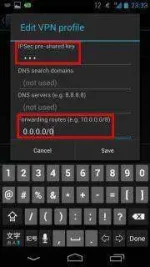
Specify "vpn" (3-letters) on the "IPSec pre-shared key" field.
Specify "0.0.0.0/0" (9-letters) on the "Forwarding routes" field. Make sure that you input the "Forwarding routes" field correctly. If not, you cannot communicate via VPN.
After all inputted, tap the "Save" button and save the VPN connection setting.
2. Connect a VPN
You can start a VPN connection by using a created VPN connection setting at any time. Open the VPN connection settings list and tap a setting, you will see the following screen.
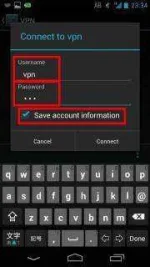
At the first time of using, you have to input "Username" and "Password" fields.
Specify "vpn" (3-letters) on both "Username" and "Password" fields, and check "Save account information" .
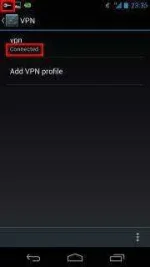
Tap "Connect" to start the VPN connection.
#PHC POWER
#LIKE AND RUN
#FEEDBACK is necessary
WHAT U READ AND WHAT U LEARNED STAYS HERE!
Initial configurations
Start the "Settings" application on Android.
In the "Wireless & Networks" category, open "More..." and tap "VPN".
Click the "Add VPN profile" button to create a new VPN connection setting.
A new VPN connection setting editing screen will appear. Input something string on the "Name" field (e.g. "vpn" ), and choose "L2TP/IPSec PSK" in the "Type" field.
On this screen, you have to specify either hostname or IP address of the destination VPN Gate Public VPN Relay Server.
(an identifier ends with ".opengw.net" ) or IP Address (digits as xxx.xxx.xxx.xxx) and paste it on the "Server address" field on the configuration screen.
- In general, DDNS Hostname (an identifier ends with ".opengw.net" ) are recommended to specify. DDNS hostname can continue to be used even if the corresponding IP address of the DDNS hostname will change in future. However, in some countries or regions, you might be unable to use DDNS hostname. If you fails to specify a DDNS hostname, try IP Address (digits as xxx.xxx.xxx.xxx) specification instead.
-
Spoiler contents are visible only to Established Members.
-
Spoiler contents are visible only to Established Members.
-
Spoiler contents are visible only to Established Members.
-
Spoiler contents are visible only to Established Members.
Scroll down the configuration screen, and tap the "Show advanced options" checkbox if appropriate.
Specify "vpn" (3-letters) on the "IPSec pre-shared key" field.
Specify "0.0.0.0/0" (9-letters) on the "Forwarding routes" field. Make sure that you input the "Forwarding routes" field correctly. If not, you cannot communicate via VPN.
After all inputted, tap the "Save" button and save the VPN connection setting.
2. Connect a VPN
You can start a VPN connection by using a created VPN connection setting at any time. Open the VPN connection settings list and tap a setting, you will see the following screen.
At the first time of using, you have to input "Username" and "Password" fields.
Specify "vpn" (3-letters) on both "Username" and "Password" fields, and check "Save account information" .
Tap "Connect" to start the VPN connection.
#PHC POWER
#LIKE AND RUN
#FEEDBACK is necessary