PH
PHmharvzdeck
Fanatic
To check or access your Philippine National ID online, you can either view and download your Digital National ID or check your delivery status.
Option 1: Download your Digital National ID
1. Visit the official You do not have permission to view the full content of this post. Log in or register now. website.
2. Enter your First Name, Middle Name, Last Name, and Date of Birth.
3. Complete the required "Liveness" (facial) authentication using your device's camera.
4. Once verified, you can view, screenshot, or click Download Digital ID to save a copy.
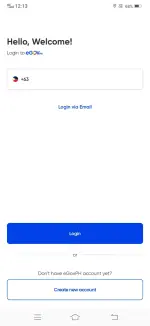
Alternatively, you can log in to the You do not have permission to view the full content of this post. Log in or register now. app on iOS or Android to view and download your digital ID.
Option 2: Check your Physical ID Delivery Status
1.Visit the You do not have permission to view the full content of this post. Log in or register now. page.
2. Enter the Transaction Reference Number (TRN) provided on your transaction slip from your registration.
3. If dispatched, you can use your TRN to track the delivery on the You do not have permission to view the full content of this post. Log in or register now. website
Option 3: Authenticate an ID
If you already have a printed or digital copy and want to check if the QR code is legitimate, use the You do not have permission to view the full content of this post. Log in or register now. tool or the You do not have permission to view the full content of this post. Log in or register now. scanner.
Option 1: Download your Digital National ID
1. Visit the official You do not have permission to view the full content of this post. Log in or register now. website.
2. Enter your First Name, Middle Name, Last Name, and Date of Birth.
3. Complete the required "Liveness" (facial) authentication using your device's camera.
4. Once verified, you can view, screenshot, or click Download Digital ID to save a copy.
Alternatively, you can log in to the You do not have permission to view the full content of this post. Log in or register now. app on iOS or Android to view and download your digital ID.
Option 2: Check your Physical ID Delivery Status
1.Visit the You do not have permission to view the full content of this post. Log in or register now. page.
2. Enter the Transaction Reference Number (TRN) provided on your transaction slip from your registration.
3. If dispatched, you can use your TRN to track the delivery on the You do not have permission to view the full content of this post. Log in or register now. website
Option 3: Authenticate an ID
If you already have a printed or digital copy and want to check if the QR code is legitimate, use the You do not have permission to view the full content of this post. Log in or register now. tool or the You do not have permission to view the full content of this post. Log in or register now. scanner.