 PH
PH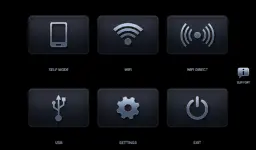
Headunit Reloaded (HUR) Emulator for Android Auto
Overview
Headunit Reloaded (HUR) is a Headunit Receiver emulator for Android Auto, originally developed by Michael Reid. It allows an Android device or Android-powered headunit to act as an Android Auto receiver.Technical Specifications
| Parameter | Details |
|---|---|
| Android Version Requirement | 5.0+ |
| Supported CPU Architectures | arm64-v8a, armeabi-v7a, x86, x86_64 |
| Supported Screen DPIs | 120dpi, 160dpi, 240dpi, 320dpi, 480dpi, 640dpi |
| Package State | Untouched ρáíd APK, Original Hash Signature, Premium |
| Certificate MD5 Digest | 445a316c63f18e7adbc9a76ef0e95105 |
| Hardware Compatibility | Joying, Eonon, Grom Vline, Xtrons, PX5, PX3, A-Sure, RK3188, RK3066, Avin, and other Android-powered headunits. |
Connection Modes and Configuration
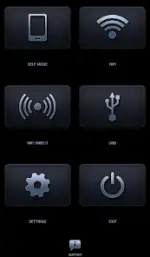
USB Mode
- Connect the USB cable to the target device (requires an OTG cable for tablets).
- Set HUR as the default application for the USB action when prompted.
- Note for Android 7.0+: Users may need to pull down the notification bar and manually select the connected USB device to initiate communication.
Wi-Fi Mode
- Install the WiFi Launcher application on the mobile phone.
- Inside WiFi Launcher, select the vehicle's Bluetooth profile to enable automatic launching.
- Enable the hotspot option within WiFi Launcher.
- Connect the car headunit to the mobile phone's hotspot and launch HeadUnit Reloaded. (Roles can be inverted with the car unit acting as the client or host).
Self Mode (Single Device)
- Run Android Auto and HUR simultaneously on the same hardware.
- Ensure Android Auto is installed, open HUR, and select Self-mode.
Troubleshooting & FAQ
- Black Screen Display:
- For dedicated Android headunits (e.g., Joying, Xtrons), verify that the system settings permit video playback while driving.
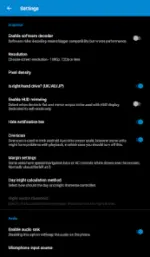
- Navigate to HUR settings and toggle Software decoding on.
Recent Changelog
- Resolved NearBy connection issues specific to Pixel devices and similar hardware.
- Modified Write permissions to be non-mandatory.
- Integrated the "draw over other apps" permission to allow the application to regain focus automatically during phone calls.