 PH
PH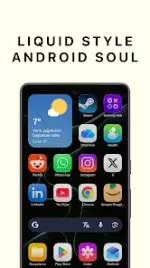

LiqUI: Liquid Glass Icon Pack (v0.1.3)
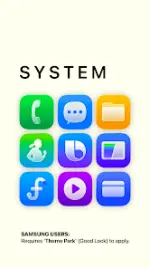
LiqUI is a vector-based icon pack featuring a "Liquid Glass" aesthetic. The design focuses on 3D glossy textures, light interaction, shadows, and color gradients optimized specifically for light-themed wallpapers and bright setups.Specifications & Package Info
| Requirement / Attribute | Details |
|---|---|
| Android Version | 5.0 and up |
| Version | v0.1.3 [Patched] |
| License / Package Type | ρáíd / Patched (Premium) |
| Architecture / Languages | CPU: None / Multi-Language support |
| Modifications | Cleaned useless files; All debug codes removed; Original package signature changed; No root, Lucky Patcher, or Modded Google Play required |
| Advertisements | Contains credit advertisement |
Key Features
- Premium Quality: 100% vector-based design for sharp resolution across various screen densities.
- Liquid & Glossy Effect: 3D depth and glossy textures distinct from flat material designs.
- Light Mode Optimized: Color palettes tuned for bright, clean setups.
- Regular Updates: Library expansion based on user requests.
Launcher Compatibility
The icon pack supports most modern launchers that allow icon customization, including:- Samsung One UI (via Theme Park)
- Nova Launcher
- Lawnchair
- Hyperion
- Action Launcher
Samsung One UI Configuration Guide
To ensure folder icons match the glossy aesthetic on the default One UI Launcher, use the Good Lock app and Theme Park module:- Open Theme Park.
- Edit the current theme.
- Tap on the Folder icon shape preview.
- Select the "Glass" or "Square" option.
- Save and apply the theme.
Changelog (v0.1.3)
- Implemented UI/UX improvements.
- Fixed manual icon selection issue within Samsung Theme Park.