 PH
PHdiscuss3387
Established
Description
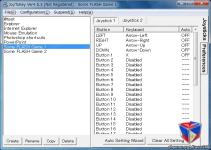
JoyToKey (or Joy2Key) enables PC game controllers to emulate the keyboard and mouse input, so that windows applications and web games can be controlled with your favorite joysticks! Whenever buttons and sticks are pressed on the controllers, JoyToKey converts them into keyboard strokes and/or mouse movements so that the target application will work as if a real keyboard and a mouse were used.
Virtual joysticks (a.k.a. SHIFT-key function)
Assume your joystick has only 6 buttons, but you want to assign 10 different key inputs to your joystick buttons. What can you do?
Then, you can configure extra key assignments for a virtual joystick number and you can switch the key assignments by pressing a special joystick button (a.k.a. SHIFT-key button).
For example, by default you're using key/mouse assignments defined for Joystick #1. But in the example below, you can switch to key/mouse assignments defined for Joystick #3 whenever "button 3" is pressed.
Button alias - Combine multiple definitions (e.g. "SHIFT + Mouse Wheel")
How can I configure a horizontal scroll (SHIFT + Mouse Wheel) for a single stick (button) input?
For assigning multiple functionalities to a single input, you can use the button alias (mapping) functionality from "Options" -> "Configure Button Alias (Mapping)...". For example, in the screenshot below, button19 is configured to be triggered when stick-left is pressed. Therefore, if you configure stick-left as a SHIFT key and Button19 as a wheel rotation, "SHIFT + wheel rotation" will be emulated when stick-left is pressed.
It is also possible to configure some button (e.g. Button22) to be triggered only when both Button5 and Button6 are pressed simultaneously. Then, you can assign 3 different functionalities for two buttons: Button5 alone, Button6 alone, and when both Button5 and Button6 are pressed.
Starting from 5.0 version, JoyToKey allows you to assign two or three sets of key-assignments for a single button, and switch among them in several ways.
Details
- File Size: 3.37 MB
Download Links
You do not have permission to view the full content of this post. Log in or register now.
You do not have permission to view the full content of this post. Log in or register now.