 PH
PH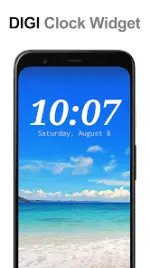
DIGI Clock Widget Plus
DIGI Clock Widget Plus is a highly customizable, ad-free digital time and date widget package designed for Android devices, including dedicated layouts for tablets.App Specifications
| Feature | Details |
|---|---|
| Base Version | ρáíd / Ad-Free version of DIGI Clock Widget |
| Minimum OS Requirement | Android 8.0+ |
| Target OS Compatibility | Up to Android 16 |
| Supported Android Generations | Honeycomb, ICS, Jelly Bean, and newer |
| Mod Features | Premium Unlocked |
Available Widget Sizes
- 2x1: Small layout
- 4x1: Wide layout (optional seconds display)
- 4x2: Large layout
- 5x2: Designed for tablets and large-format devices (e.g., Galaxy Note)
- 6x3: Optimized for tablets
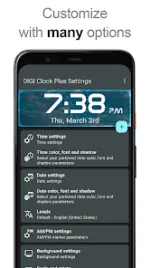
Key Features and Customization
- Real-time Preview: Visualizes configurations during setup (Android 4.0 ICS+).
- Click Actions: Customizable tap triggers to launch the alarm application, widget settings, or any installed app.
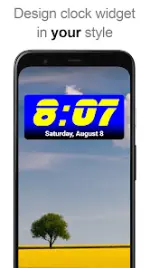
- Aesthetics & Typography: * Independent color selection for time and date.
- Customizable shadow effects (with color picker) and outlines.
- 40 built-in fonts, with support for custom fonts loaded from storage.
- Background Controls: * Adjustable background color and opacity (0% transparent to 100% opaque).
- Support for image backgrounds.
- Time & Date Formatting: * 12/24-hour toggle and show/hide AM/PM option.
- Multiple predefined date formats alongside fully customizable configurations.
- Locale preferences for localized date outputs.
- Alarm icon visibility toggle.
Installation Guide
Android 4.0 (ICS) and Later
- Open the All Apps menu from the Home screen.
- Select the Widgets tab at the top.
- Swipe left to locate DIGI Clock Plus.
- Touch, hold, and drag the desired widget size onto the Home screen.
Older Android Versions (Pre-ICS)
- Long-press an empty space on the Home screen.
- Select Widgets from the pop-up menu.
- Find and select the preferred size of DIGI Clock Plus.
Lock Screen Installation (Android 4.2+)
- Swipe to the leftmost page of the lock screen and tap the "+" icon.
- Select DIGI Clock Plus.
- Optional: To make it the primary lock screen widget, long-press and drag it to the rightmost position.
Troubleshooting Note: If the widget does not appear in the widget list after installation, restart the device.
Technical Constraints & Stability
- Storage Restriction: Do not move this application to an SD card. External storage deployment disables widget functionality.
- Task Killers: Exclude the widget from active memory cleaners or task killers to prevent time-freezing bugs.
Version History
| Version | Update Highlights |
|---|---|
| 3.8.0 | Design modifications and general bug fixes. |
| 3.7.0 | Enhanced compatibility for Right-to-Left (RTL) languages. |
| 3.6.1 | Optimization of color and font selection tools. |
| 3.6.0 | Restored custom corner rounding functionality; added compatibility updates for Android 16. |

.webp "(ditto) :(ditto):")
