🔒 Closed Queencee vpn v9 gravity (all networks)

Status
Not open for further replies.
Isang beses lang ako naka-connect tas di na gumalaw yung up and down arrows nung data ko sabay dc pero sobrang bilis sana eh. Anyway thanks for sharing po. Btw, default gamit ko no load. :) Godbless!
Twentyfourever
If you see no activity from the Data Graph, you can...
· Do a CDC
· Stop/Close then relaunch QueenCee VPN V9 Gravity.
( You can do them both at the same time too.)
Do it over and over again until you get a good connection from your location.
 
Cyrusburaot what is your sim in use, tell if it is on default or registered to a promo too.
Screenshot_2017-02-01-16-18-08.webp
 
Globe LTE mam
Cyrusburaot Go to Settings-More-Cellular Networks-Preferred Cellular Networks and tick on 3G Only or WMCDA.

Then on our VPN,
If you see no activity from the Data Graph, you can...
· Do a CDC
· Stop/Close then relaunch QueenCee VPN V9 Gravity.
( You can do them both at the same time too.)
Do it over and over again until you get a good connection from your location.
 
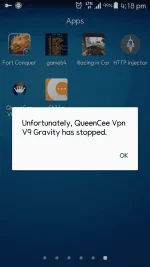
Cyrusburaot Seeing the ss, I believe it is an android internal memory issue or our VPN is not compatible with your cp. It can be that you need to free you cp from other unused apps to give it enough space.
Cyrusburaot try uninstalling QueenCee VPN V9 then download and install a fresh one. Be sure to input the correct entries on the VPN and on the APN too. If you are still unable to connect then it is confirmed that your unit is not compatible with our particular VPN version now.
 
Status
Not open for further replies.

About this Thread

  • 3K
    Replies
  • 167K
    Views
  • 1K
    Participants
Last reply from:
ryan_ryu

Online now

Members online
1,045
Guests online
1,201
Total visitors
2,246

Forum statistics

Threads
2,271,435
Posts
28,935,513
Members
1,238,614
Latest member
gollo
Back
Top