 PH
PHif you always use online converters for images, videos, audio, documents, spreadsheets, subtitles, or fonts, this one is worth checking.
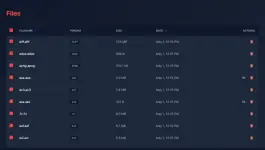
May nakita akong open-source tool that lets you run your own file converter locally or on your own server.
The good part is your files don’t get uploaded to random third-party websites. Everything is processed on your own machine or server, so mas private siya compared to normal online converters.
What you can do:
• Convert images, videos, audio, documents, spreadsheets, subtitles, and fonts
• Run it locally or self-host it with Docker
• Convert large files depending on your own storage
• Use built-in accounts and role-based access
• Automate conversions using the API
• Choose from multiple light and dark themes
This is useful for:
• People who convert files often
• Devs who need a converter API
• Teams that want private file processing
• Anyone avoiding random online converter sites
Setup is Docker-based, so may konting technical work. Also, be careful if you expose it publicly online. Better to keep it private or behind proper security.
You do not have permission to view the full content of this post. Log in or register now.
May nakita akong open-source tool that lets you run your own file converter locally or on your own server.
The good part is your files don’t get uploaded to random third-party websites. Everything is processed on your own machine or server, so mas private siya compared to normal online converters.
What you can do:
• Convert images, videos, audio, documents, spreadsheets, subtitles, and fonts
• Run it locally or self-host it with Docker
• Convert large files depending on your own storage
• Use built-in accounts and role-based access
• Automate conversions using the API
• Choose from multiple light and dark themes
This is useful for:
• People who convert files often
• Devs who need a converter API
• Teams that want private file processing
• Anyone avoiding random online converter sites
Setup is Docker-based, so may konting technical work. Also, be careful if you expose it publicly online. Better to keep it private or behind proper security.
You do not have permission to view the full content of this post. Log in or register now.