 PH
PH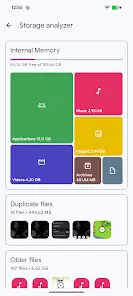
Application Overview
Solid Explorer is a dual-pane file management application designed for Android and Chromebook devices, featuring keyboard and mouse support. It provides advanced navigation, security, and cloud/network storage integration.App Specifications
| Property | Detail |
|---|---|
| Minimum OS | Android 6.0+ |
| Version | v3.5.2 |
| Interface Layout | Old-school file commander-inspired dual-pane layout |
Core Capabilities
File & Storage Management
- Navigation & Collections: Browses internal storage, SD cards, and USB OTG. Files are automatically organized into collections (Downloads, Recent, Photos, Videos, Music, Documents, and Apps).
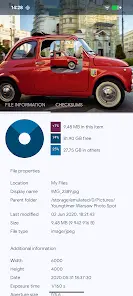
- Search & Storage Analysis: Indexed search with filters. Storage analysis is accessible via folder properties, displaying space percentages and listing the largest files, alongside size-filtered search options.
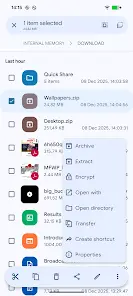
- File Operations: Standard view, delete, move, rename, and share capabilities. Includes a batch rename tool with naming pattern support.
- Built-in Tools: Internal image viewer, music player, and text editor.
- FTP Server: Enables local file access from a PC.
- Customization: Supports themes and icon sets.
Security & Encryption
- AES Encryption: Protects selected files within a secure folder, requiring a password or fingerprint confirmation. Encrypted files remain secure on the device even if the application is uninstalled.
Cloud & Network Integration
- Cloud Storage: Integration with Google Drive, OneDrive, Dropbox, Box, Owncloud, SugarSync, MediaFire, Yandex, and Mega (requires ρáíd add-on).
- NAS / Network Protocols: Support for FTP, SFTP, SMB (Samba), and WebDav protocols. Drag-and-drop transfers are supported between different panels/remote locations.
- Archive Support: Formats include ZIP, 7ZIP, RAR, and TAR.
- Root Access: Root explorer capabilities for browsing system files on rooted devices.
Version History & Updates
Changelog (v3.5.2)
- Implemented a new system for resumable file operations to increase transfer reliability.
- General fixes and performance improvements.
Modification Details
- Premium Unlocked: Full/ρáíd features are enabled without requiring an additional license key.
- Privacy & Analytics: Analytics, Crashlytics, Firebase, debug code, and startup actions are disabled.
- Ad Removal: Ads permissions, services, providers, and layouts are removed or disabled; ad-related links and invoked methods are nullified.
- Permissions Cleanup: Unwanted permissions, receivers, providers, and services are removed from the
AndroidManifest.