 PH
PH
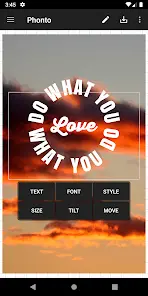

Application Overview
Phonto is an application designed for adding text overlays to images. It supports extensive typography customization, including the ability to import custom user fonts.Build Details
| Specification | Details |
|---|---|
| Application Name | Phonto - Text on Photos |
| Version | v1.7.128 (Build 171) |
| Architecture | noarch |
| Supported Screen DPIs | 160dpi, 240dpi, 320dpi, 480dpi, 640dpi |
| Content Rating | 10+ |
| Modification State | Premium / Unlocked / Ad-Free |
Core Features
- Font Library: Includes over 200 native fonts with support for custom font installation.
- Text Manipulation: Controls for size, rotation, letter spacing, and line spacing.
- Styling Options: Customizable text color, stroke color/width, background color, and shadow effects.
- Advanced Rendering: Support for adjustable blend modes.
Custom Font Installation Procedure
- Download a compatible font file (
.zip,.ttf, or.otf) from an online source. - Open the downloaded font file directly within the Phonto application to install.
- Verify the font's license terms prior to commercial or public use.
Modification Changelog
- Premium features unlocked.
- Ad-Free option permanently activated (all advertisements removed).
- All debugging information removed from the build.