 PH
PH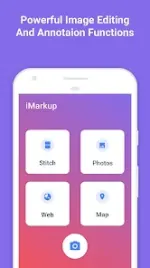

Technical Specifications
| Parameter | Details |
|---|---|
| App Name | iMarkup: Text, Draw on photos |
| Version | v1.4.0.5 b500034 [Premium] |
| Android OS | 6.0+ |
| Architecture | arm7 + arm64 |
| File Size | 19.8 MB (Less than 10MB install size) |
| Format | PNG (Lossless save supported) |
| Storage | External SD card support |
| SHA-256 | d06c0346b43b844c89933afb6f698c52cb1a9e89e9eb553ad549010bcb0a5fd2 |
Core Features
Photo Markup
- Crop and Rotate: Supports rectangle, round, star, triangle, and other shapes.
- Spotlight: Highlights specific areas of an image.
- Blur: Pixelates specified sections for privacy.
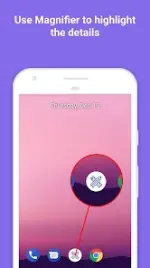
- Magnifier: Zooms in on selected sections.
- Emoji Stickers: Adds visual elements to images.
- Custom Text: Configurable color, background, shadow, stroke, style, and size.
- Annotation Tools: Arrows, rectangles, circles, lines, and pen.
- Large Image Support: Direct annotation without prior cropping.
- Media Handling: Import from gallery, HD save option.
Photo Stitching
- Combines multiple photos into a single panoramic image (horizontal or vertical orientation).
Long Image Split
- Divides long screenshots or images into multiple pieces horizontally or vertically.
- Equal Split: Automatically divides the image evenly with a single tap.
- Manual Split: Allows precise configuration of custom split positions.
Image to PDF
- Converts one or multiple images into a single, ordered PDF document.
- Supports batch importing and one-tap PDF generation.
Webpage & Map Annotation
- Allows direct markup capability on web pages and maps.
Release Notes
v1.4.0.5 b500034
- Bug fixes and experience improvements.