 PH
PH

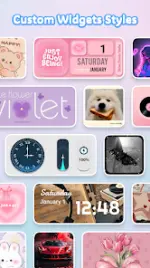
App Overview: Themely - Icons & Widgets
Themely is a customization utility for Android devices designed to modify the visual interface of home and lock screens through integrated themes, widgets, and icon packs.Technical Specifications
| Detail | Specification |
|---|---|
| Version | 1.0.0.514 |
| Android OS | 7.0 and up |
| Architecture | armeabi-v7a, arm64-v8a |
| Modification | Premium features unlocked; redundant files removed |
| Modder | TRUMods |
Core Features
Theme & Wallpaper Library
- Database: Access to over 10,000 live 3D themes.
- Styles: Aesthetics include Neon, Anime, K-pop, Sports, and seasonal themes (Christmas, Halloween).
- Deployment: One-click application for high-definition wallpapers and full-screen themes.
Widget Customization (1000+ Options)
- System Widgets: Battery status, control panel, calendar, clock, and weather.
- Media Widgets: Dynamic image effects, GIF support, and DIY photo widgets using gallery images.
- Visual Styles: Specialized neon dynamic widgets and varied geometric shapes (circular, rectangular).
DIY Icon Packager
- Customization: Edit icon fonts, colors, transparency levels, and background colors.
- Application Support: Includes specific styling for social media applications.
- Visual Effects: Features neon glow effects and custom icon creation for individual apps.
Permissions and Security
- Accessibility Service: Required to enable control center features, including Do Not Disturb mode, screen recording, screenshots, and media/volume adjustments.
- Data Policy: According to the developer, the Accessibility Service is utilized for system modification only; no user data is collected or stored via this permission.
Implementation Guide
- Launch Themely - Icons & Widgets.
- Select desired theme, wallpaper, sticker, or widget assets.
- Utilize the one-click replacement tool to apply changes to the system UI.