 PH
PH

App Overview: Themely - Icons & Widgets
Themely is a customization utility for Android devices designed to modify home and lock screen aesthetics through integrated themes, widgets, and icon packs.Technical Specifications
| Feature | Details |
|---|---|
| Version | 1.0.0.490 |
| Compatibility | Android 7.0 and up |
| Architecture | armeabi-v7a, arm64-v8a |
| Status | Premium Unlocked (Modded by TRUMods) |
Core Features
Theme & Wallpaper Library
- Database: Over 10,000 live 3D themes.
- Aesthetics: High-definition wallpapers covering categories such as Anime, K-pop, Neon, Sports, and Seasonal (Christmas/Halloween).
- Interface: One-click application for global theme replacement.
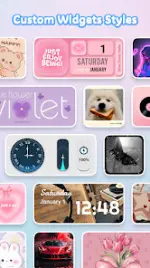
Widget Customization (1,000+ Options)
- System Widgets: Battery status, control panel, calendar, clock, and weather.
- Dynamic Content: Real-time image effects, GIFs, and neon-styled widgets.
- DIY Functionality: Users can create personalized widgets using images from their local gallery.
Icon Modification
- DIY Icons: Customization of app icons including social media platforms.
- Design Tools: Adjustable parameters for fonts, color palettes, transparency levels, and background styles.
- Visual Effects: Support for neon glow and stylized icon packs.
Installation & Usage
- Install Themely - Icons & Widgets.
- Launch the application.
- Select preferred assets (Theme, Wallpaper, Sticker, Widget, or Icon).
- Execute a one-click replacement to apply changes.
Privacy & Permissions
To facilitate system-level modifications-such as control center overlays, "Do Not Disturb" toggles, screen recording, and media volume control-the app requires Accessibility Service permissions. The developer states that no user data is stored or leaked through this access.Mod Information
- Premium features unlocked.
- Redundant/useless files removed for optimization.
- Architecture support for armeabi-v7a and arm64-v8a.