 PH
PH
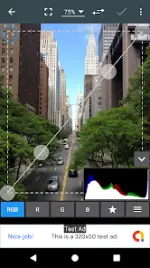
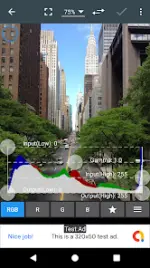
Photo Editor v12.9 (Build 2026041600)
Photo Editor is a mobile application designed for precise photo manipulation and advanced image editing, offering a toolset comparable to desktop software.Technical Specifications
| Category | Details |
|---|---|
| Version | 12.9 (Build 2026041600) |
| OS Requirement | Android 8.0+ |
| CPU Architectures | arm64-v8a, armeabi-v7a, x86, x86_64 |
| Supported DPIs | 160dpi, 240dpi, 320dpi, 480dpi, 640dpi |
| Mod Status | Premium Unlocked, Ad-Free, Debug code removed |
Core Functional Features
| Toolset | Included Features |
|---|---|
| Color Adjustment | Exposure, brightness, contrast, saturation, temperature, tint, and hue. |
| Advanced Color | Curves and Levels for fine-tuning. |
| Visual Effects | Gamma correction, auto contrast, auto tone, vibrance, blur, sharpen, oil paint, sketch, high contrast B&W, and sepia. |
| Geometry | Rotation, straighten, crop, and resize. |
| Corrections | Perspective, lens, red-eye, white balance, and backlight. |
| Artistic Tools | Text, image/shape overlays, frames, denoise, drawing, pixelation, and cloning. |
Utility and Batch Tools
- File Formats: Save and export in JPEG, PNG, GIF, WebP, and PDF.
- Metadata Management: View, edit, or delete EXIF, IPTC, and XMP data.
- Batch Operations: Batch processing, puzzle cropping, ZIP compression, PDF creation, and animated GIF generation.
- Media Capture: Capture Webpages, Video, and PDF.
- Specialized Utilities: Photo comparison tool, GIF frame extractor, and SVG rasterizer.
Version 12.9 Changelog
- Resolved application crashes.
- General bug fixes.