 PH
PH
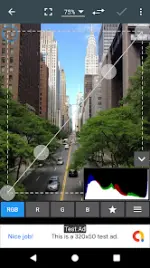
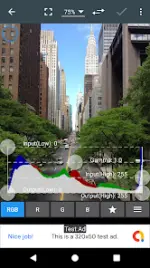
Photo Editor v12.8
Photo Editor is a comprehensive photo manipulation tool designed for mobile devices, offering functionality comparable to desktop editing software. It supports a broad range of tasks from basic enhancements and filters to advanced operations such as curve adjustments and metadata management.Technical Specifications
| Category | Details |
|---|---|
| Version | 12.8 (Build 2026040700) |
| Android OS | 8.0+ |
| Architectures | arm64-v8a, armeabi-v7a, x86, x86_64 |
| Screen DPI | 160dpi, 240dpi, 320dpi, 480dpi, 640dpi |
| Mod Status | Premium/Unlocked (Ad-Free, Debug code removed) |
Key Features
- Color Adjustment: Exposure, brightness, contrast, saturation, temperature, tint, and hue.
- Advanced Tools: Fine-tuning via Curves and Levels; Gamma correction.
- Effects: Auto contrast, auto tone, vibrance, blur, sharpen, oil paint, sketch, black & white high contrast, and sepia.
- Object Integration: Add text, images, or geometric shapes.
- Transformation: Rotation, straighten, crop, and resize.
- Technical Corrections: Perspective, lens distortion, red-eye removal, white balance, and backlight compensation.
- Metadata: View, edit, or delete EXIF, IPTC, and XMP data.
- Output Formats: JPEG, PNG, GIF, WebP, and PDF.
Utility & Batch Tools
| Category | Functionality |
|---|---|
| Batch Processing | Batch edit, Crop (Puzzle), Compress to ZIP. |
| Capture Tools | Webpage capture, Video capture, PDF capture. |
| Media Creation | Animated GIF creation, GIF frame extractor, SVG rasterizer. |
| Interface | Touch and pinch-to-zoom; Comparison mode. |
What's New in v12.8
- Text and Image module improvements.
- General crash and bug fixes.