 PH
PH
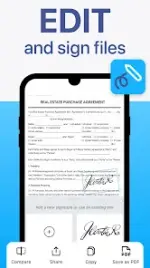

TapScanner: Portable PDF Scanner & Editor
TapScanner is a mobile document management utility designed for high-quality PDF creation, editing, and file organization. It features a compact binary footprint of 20MB and utilizes machine-learning-enhanced OCR for text extraction.Technical Specifications
| Category | Details |
|---|---|
| Version | v3.1.01 (Build 3101) |
| App Size | ~20MB |
| Architecture | arm64-v8a, armeabi-v7a |
| DPI Support | 160dpi, 240dpi, 320dpi, 480dpi, 640dpi |
| Languages | Multi-language support |
| Build Status | Pro/ρáíd features unlocked; Debug code removed |
Core Functionality
Scanning & Image Processing- Auto-Detection: Automatic border detection and cropping for receipts, IDs, and whiteboards.
- Image Enhancement: Professional filters to remove shadows, artifacts, and watermarks.
- Adjustment Tools: Manual control over brightness, contrast, and black-and-white conversion.
- OCR Engine: Converts images to editable text using automated machine learning recognition.
- File Manipulation: Split a single PDF into multiple files or merge several PDFs into one.
- Compression: Built-in PDF reduction tools to minimize file size for storage or sharing.
- Format Conversion: Supports JPG to PDF, PDF to JPG, and PDF to Word/Doc conversion.
- E-Signatures: Tools for marking fields and attaching digital signatures to PDF documents.
- Security: Password protection (Lock PDF) for sensitive files.
- Cloud Integration: Automated backup to third-party cloud storage services.
- Organization: Folder-based management with tagging and library search (name, tag, or folder).
- QR Scanner: Built-in module for reading QR codes (links, ISBN, text, and emails).
- Printing: Direct-to-printer support via the mobile interface.
Mod / Technical Changes
- Pro / Premium features unlocked.
.sourceattributes removed from Java files.- Comprehensive removal of debug code.
- Stability improvements and bug fixes integrated in Build 3101.