 PH
PH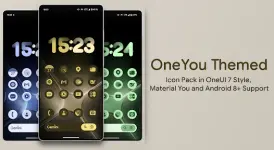
OneYou Themed - Dynamic Icon Pack
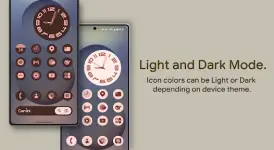
Version: 5.5.0.Beta [Patched/Premium] Required Android OS: 8.0 and upOneYou is a dynamic icon pack inspired by Samsung OneUI 7. The icons feature adaptive coloring based on the system wallpaper or accent colors and automatically adjust between light and dark modes depending on the device settings.
Core Features
- Total Icons: 27,000+ Adaptive Dynamic Icons
- Widgets: Themed Widgets (Android 12+ exclusive)
- Functional Requirements: Google App and Google Lens required for search widgets
Launcher Compatibility & Color Automation
| Mode | Android Version | Supported Launchers |
|---|---|---|
| Automatic Color Change | 8.0+ | Lawnchair (12.1 - 14 Dev), Hyperion (Beta), Kvaesitso, Smart Launcher (Beta) |
| Automatic Color Change | 12.0+ | Niagara, Nova (8.0.4+ Beta), Stario, AIO, Pixel Launcher (via Shortcut Maker on A13) |
| Manual Reapplication Required | 12.0+ | Action Launcher, Ruthless Launcher, Stock One UI (via Theme Park) |
Configuration Guides
Android 8 - 13 (Automatic Color Setup)
- Lawnchair (v1415+): Enable "Themed Icons" for both Home Screen and App Drawer.
- Hyperion (Beta):
- Set color scheme:
Settings > Colors > Theme > Base Color > Wallpaper color. - Enable icons:
Settings > Iconography > Themed Icons.
- Set color scheme:
Samsung One UI (Stock)
To activate Monet color matching on Samsung devices:- Navigate to System Settings > Wallpaper and Styles.
- Set wallpaper and choose a System Color Palette.
- Apply icons via Theme Park to ensure system-wide compatibility.
Google Pixel (Stock)
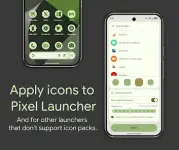
- Non-Rooted: Use the Shortcut Maker app to apply icons to the home screen.
- Rooted: Use Pixel Launcher Mods to apply icons to both the desktop and app drawer.
Technical Notes
- Icon Shapes: These are adaptive icons. Shape rendering (Circle, Squircle, etc.) is determined by the system mask provided by the OEM. A custom launcher is required if the stock launcher does not support shape shifting.
- Manual Refresh: For launchers not supporting automatic updates, users must reapply the icon pack (or toggle to a different pack and back) after changing wallpapers or switching between Light/Dark modes.
Version 5.5.0.Beta Changelog
- Icon Expansion: Added 600+ icons (Total exceeds 27k).
- Mini-Folder Overhaul: Integrated Category support, Icon Picker, new shapes, and backgrounds.
- Widgets: New Search Widget design added.
- Optimizations: Redesigned select icons and fixed application bugs for specific activities.